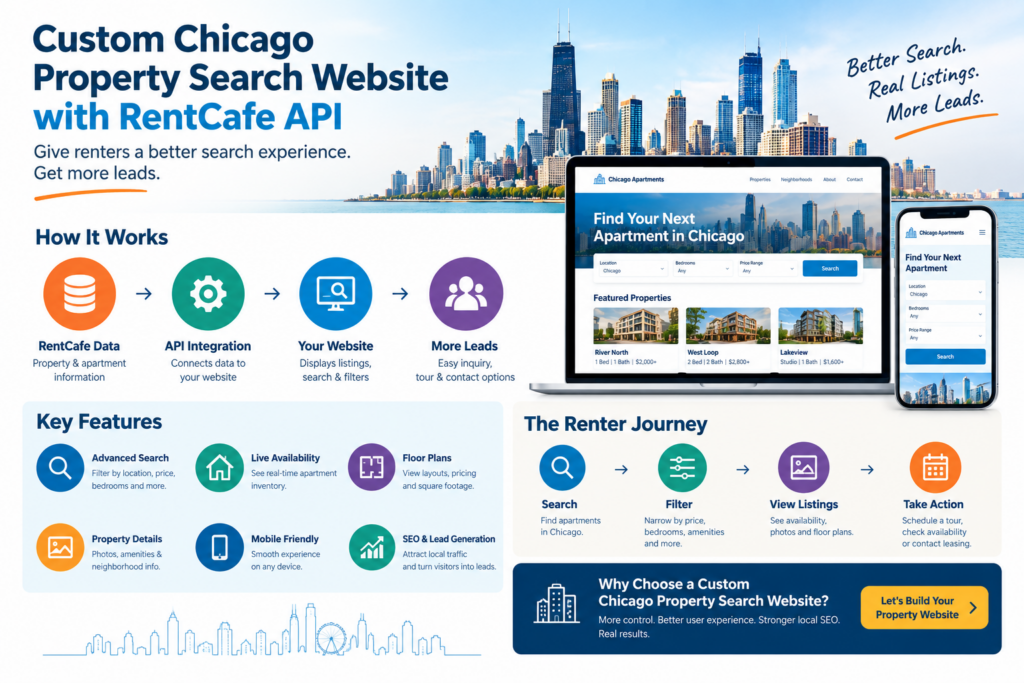
Custom Chicago Property Search Website with RentCafe API

Custom Chicago Property Search Website with RentCafe API
Finding an apartment in Chicago shouldn’t feel like searching through a spreadsheet.

But that’s still how many property websites feel. A visitor lands on the site, clicks around a few pages, struggles to find available units and eventually ends up on another apartment portal.

For property managers and multifamily companies, this is a missed opportunity.

A well-designed Chicago property search website can give renters a much easier way to find apartments, compare floor plans, check availability and contact the leasing team. When combined with a RentCafe property search integration, the website can become much more than a collection of property pages. It can become a useful search and lead-generation platform.

This is especially valuable for Chicago property managers handling multiple communities across areas such as River North, West Loop, Lincoln Park, Lakeview, South Loop and Streeterville.

The idea is simple: bring property information into one easy-to-use website and make it much easier for renters to find what they’re looking for.

Why Build a Custom Chicago Property Search Website?

There are plenty of large apartment portals already available.

So why would a property management company invest in a custom search website?

Because your own website gives you control.

You control the design, branding, property content, SEO strategy, calls to action and the overall renter experience.

You also aren’t sending every visitor to a third-party marketplace where they can immediately start comparing your property with hundreds of competitors.

A custom property search website can be built around your specific portfolio.

For example, a renter could start by selecting:

Chicago → Neighborhood → Property → Apartment Type → Price → Availability

From there, they can view matching apartments and move directly toward an inquiry or tour request.

That is a much cleaner journey.

How RentCafe API Can Power Apartment Search

The technical side is where the RentCafe API can become useful.

Depending on the available RentCafe account and API/integration access, property and apartment information can be connected to a custom website.

The exact information available will depend on the integration, but the concept can include property information, apartment availability, floor plans and other relevant listing data.

A typical architecture might look like:

RentCafe → API → Website Database/Cache → Property Search → Apartment Details → Lead Form

The website doesn’t necessarily need to request fresh information from the API every time someone opens a page. Depending on the project, data can be synchronized or cached to help create a faster browsing experience.

This is one reason it’s important to work with a developer who understands both the API integration and the website experience.

Connecting the data is only the beginning.

What Makes a Good RentCafe Property Search Experience?

A RentCafe property search should be designed around the renter.

That sounds obvious, but it gets missed surprisingly often.

A renter doesn’t care that your website has a technically impressive API integration. They care about finding an apartment.

The search interface should therefore be straightforward.

A visitor might want to search by:

  • Location
  • Property
  • Apartment type
  • Bedrooms
  • Bathrooms
  • Price range
  • Square footage
  • Availability
  • Amenities

The exact filters depend on the information available through your integration.

Don’t add every possible filter just because you can.

Too many options can make the interface confusing.

The best search experience usually gives people enough control to narrow their choices without making them feel like they’re filling out a government form.

Apartment Finder Website Development for Chicago

If you’re planning apartment finder website development, the search experience should be one of the first things discussed, not something added at the end.

Think about the renter journey.

They may search Google for:

“apartments for rent in Chicago”

“1 bedroom apartments in River North”

“luxury apartments in West Loop Chicago”

or

“pet friendly apartments near downtown Chicago.”

They click your website.

What happens next?

If they immediately see a useful search experience, they have a reason to stay.

If they only see a large banner and a generic “Learn More” button, you may lose them.

A custom apartment finder can bring the search functionality directly into your website and make it easier for users to move from search results to a property page.

Create Better Property and Apartment Pages

Search results should lead somewhere useful.

A custom Chicago property search website should have strong property pages and apartment detail pages.

For example, an apartment page could include:

2 Bedrooms | 2 Bathrooms | 1,150 Sq. Ft.

along with pricing, availability, photos, floor plan and relevant amenities, depending on the data available.

The visitor should also have an obvious next action.

Check Availability

Schedule a Tour

Ask About This Apartment

Contact Leasing

These small details matter.

You don’t want someone finding the perfect apartment and then having to search the website to figure out how to contact you.

Floor Plans Are a Major Part of Apartment Search

For multifamily websites, floor plans deserve special attention.

A renter can look at ten photos of an apartment and still not understand the layout.

A floor plan helps answer that question quickly.

A custom website can present floor plans alongside apartment details so the visitor doesn’t have to leave the page.

Depending on the available RentCafe data, the website may be able to display information associated with available floor plans and units.

The better the presentation, the easier it becomes for renters to compare options.

And when someone reaches out after viewing the floor plan, that inquiry is often more useful to the leasing team than a generic “I’m interested” message.

Chicago Neighborhood Search Can Support Local SEO

This is another major reason to build a custom property search website instead of relying entirely on a third-party listing portal.

Chicago has a huge range of neighborhoods, and renters often search by location first.

A well-planned website can create useful content around areas such as:

River North

West Loop

Lincoln Park

Lakeview

South Loop

Streeterville

Gold Coast

Wicker Park

Logan Square

Hyde Park

For example, a neighborhood page can explain what it’s like to live in West Loop, transportation options, nearby restaurants, parks, attractions and the types of apartments available in the area.

The page can then connect visitors to relevant properties.

This creates a natural relationship between Chicago apartment search, local SEO and property marketing.

Don’t create hundreds of nearly identical neighborhood pages just for keywords. Google is much better at recognizing thin, repetitive content now.

Give each important location a real purpose.

Build a Search Website That Works on Mobile

Apartment searches are heavily mobile.

A renter might be looking for a new apartment from a train, coffee shop, office or while walking around the neighborhood.

The website needs to work just as well on a phone as it does on a desktop.

Search filters should be easy to open and close.

Apartment cards should be readable.

Images shouldn’t slow everything down.

Floor plans should be viewable without awkward zooming.

And the contact button should always be easy to find.

This is particularly important for Chicago properties because many renters are making quick decisions based on location, commute and availability.

A fast mobile experience can be the difference between an inquiry and a lost visitor.

SEO Benefits of a Custom Property Search Website

A custom website can also give property managers more control over SEO.

But there is an important point here.

A RentCafe API integration does not automatically make your website rank on Google.

The integration provides useful property data. SEO comes from how that information is structured and supported by the rest of the website.

Your SEO strategy can include:

  • Location-focused property pages
  • Chicago neighborhood content
  • Apartment type pages
  • Useful renter guides
  • Optimized title tags and headings
  • Internal linking
  • Image optimization
  • Fast page speed
  • Mobile-friendly design
  • Structured data where appropriate
  • Clear and crawlable URLs

You can also create content around long-tail searches such as:

Best neighborhoods for apartments in Chicago

Luxury apartments in River North

1 bedroom apartments in West Loop Chicago

Pet-friendly apartments in Chicago

Chicago apartments near public transportation

These searches may have different levels of competition, but together they can create a strong local search footprint.

If you are also working on the overall structure of your real estate website, check our guide on building a high-converting real estate WordPress website for additional ideas around SEO, property pages and lead generation.

Don’t Let Search Traffic Leave Without an Inquiry

This is where many property websites need improvement.

They focus heavily on getting traffic but forget about conversion.

Imagine someone searches for an apartment, finds your property, looks at three floor plans and then can’t find a simple way to contact the leasing team.

That’s frustrating.

Your search results and apartment pages should always have a logical next step.

You can also experiment with different calls to action.

For some visitors, “Schedule a Tour” may work.

For others, “Check Availability” or “Ask a Question” may feel easier.

The point isn’t to push everyone into the same action.

Give renters an easy way to continue.

Can WordPress Be Used for a Custom Chicago Property Search?

Yes, WordPress can be used as the foundation for a custom property search website, provided the integration is designed appropriately.

WordPress can manage the marketing content while custom development handles the property search, listing display and API-related functionality.

This combination can be particularly useful for property managers because the marketing team can continue managing pages, blog posts, neighborhood content and other website content without having to modify the underlying integration every time.

The technology should stay in the background.

The renter should simply see a fast and useful apartment search.

Managing Multiple Chicago Properties From One Website

If your company manages several properties, a custom search platform becomes even more useful.

Instead of sending users to separate websites for every property, you can provide one central search experience.

Someone looking for a one-bedroom apartment can see available options across your portfolio.

They can then compare properties based on location, price, amenities or apartment type.

For a Chicago property management company, this can make the website much more valuable.

It becomes a portfolio search platform rather than a brochure for one building.

What Should You Ask a RentCafe API Developer?

Before starting the project, ask the developer a few practical questions.

What RentCafe data can be accessed through your account?

Can the website display apartment availability and floor plans?

Can the search system support multiple properties?

How will the API data be synchronized or cached?

How will API errors be handled?

Will the apartment pages be SEO-friendly?

Can the search results be tracked in Google Analytics or another analytics platform?

Can inquiry forms be connected to the relevant property or apartment?

These questions are important because every RentCafe project isn’t exactly the same.

The available data and technical requirements should be reviewed before development starts.

A Custom Search Website Can Become a Lead Engine

The real value of a Chicago property search website isn’t the search box itself.

It’s what happens after the search.

A renter searches.

They find a suitable apartment.

They view the floor plan.

They check the amenities.

They explore the neighborhood.

Then they contact the leasing team.

That’s the journey you want.

Your website should make that journey as easy as possible.

If you’re already using RentCafe but your current website doesn’t provide a good apartment search experience, you don’t necessarily need to start everything from scratch. A website redesign with a properly planned RentCafe integration may be enough.

And if you’re launching a new multifamily website, it’s better to plan the search, SEO and lead-generation structure before development begins.

Ready to Build a Better Chicago Property Search Website?

A custom Chicago property search website with RentCafe API can give property managers more control over apartment search, property presentation, SEO and lead generation.

The goal isn’t to build something complicated.

It’s to make it easier for a renter to find the right property and take the next step.

If you’re managing Chicago multifamily properties and considering a new website, apartment finder functionality, RentCafe integration or a redesign of an existing property website, share your current website and requirements.

A quick review can help identify what should be improved first — whether that’s the search experience, listing pages, mobile design, SEO or lead conversion.


Frequently Asked Questions

1. What is a Chicago property search website?

A Chicago property search website allows renters to search for apartments and properties based on criteria such as location, bedrooms, price, availability and amenities. It can combine property listings with search, filtering and lead-generation features.

2. Can RentCafe API be used to build a Chicago apartment search website?

Yes, depending on the RentCafe account and available API or integration access. A developer can use the available data to create a customized apartment search experience on a website.

3. What information can a RentCafe property search display?

Depending on the available integration, a website may display property information, apartment availability, floor plans, pricing, unit details and other relevant listing information.

4. Can RentCafe API be integrated with WordPress?

Yes. WordPress can be used as the website platform while custom development handles the RentCafe API integration, property search and listing functionality.

5. Can a custom apartment search website support multiple Chicago properties?

Yes. A properly planned system can allow visitors to search across multiple properties and communities from one website.

6. Can RentCafe listings help with Chicago local SEO?

RentCafe data can support property pages, but integration alone does not guarantee rankings. Local SEO should also include useful neighborhood content, optimized property pages, internal linking, technical SEO and a good user experience.

7. Can a custom property search website display floor plans?

Yes, where the required floor plan data is available through the integration. Floor plans can be displayed alongside apartment information to help renters compare available options.

8. How does an apartment finder website generate leads?

An apartment finder website can generate leads by making it easy for visitors to search for suitable apartments and then take actions such as requesting information, checking availability, scheduling a tour or contacting the leasing team.

9. Is a custom RentCafe integration better than a standard listing page?

It depends on the business requirements. A custom integration can provide more control over search, design, SEO, property presentation and lead generation, while a standard solution may be sufficient for simpler websites.

10. How much does a custom Chicago property search website cost?

The cost depends on the number of properties, RentCafe integration requirements, search filters, floor plans, design, WordPress development, SEO requirements and lead-generation features. A project should be reviewed before providing an accurate estimate.
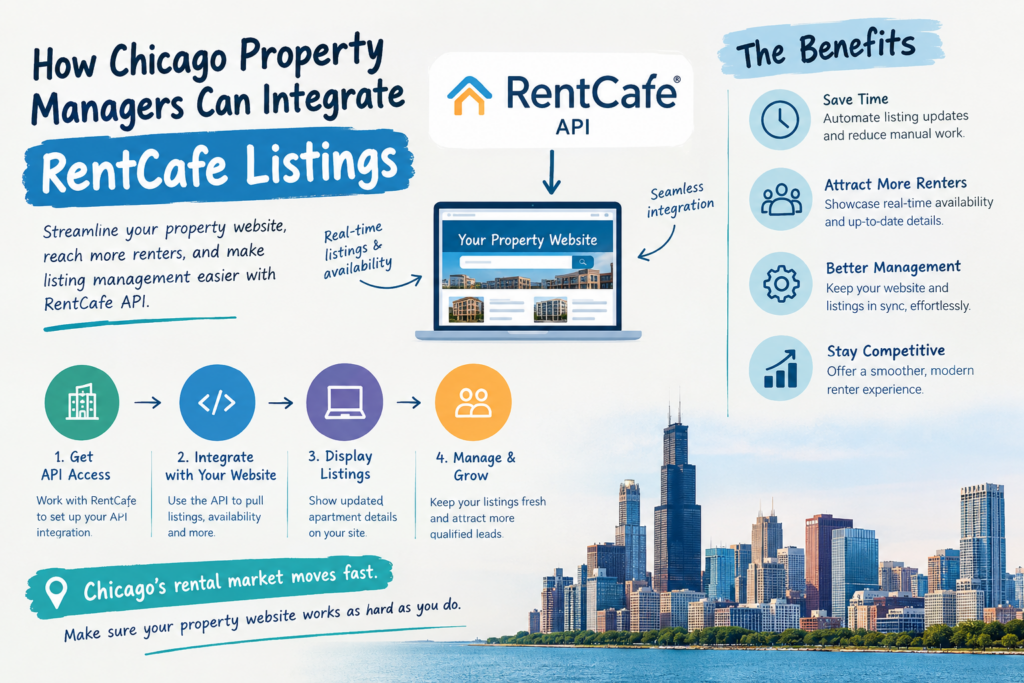
How Chicago Property Managers Can Integrate RentCafe Listings

How Chicago Property Managers Can Integrate RentCafe Listings

rentcafe api integration

If you manage apartments in Chicago, you already know that getting people to your website is only part of the job. The bigger challenge is helping them quickly find the right apartment, check availability, view a floor plan and contact your leasing team.

That is where RentCafe listings Chicago integration can be useful.

Instead of manually updating apartment availability, pricing, floor plans and unit information across your website, you can connect your website with RentCafe data and create a much better experience for potential renters.

For a Chicago property manager handling one property or a larger multifamily portfolio, this can save time and make the website much more useful as a marketing and lead-generation tool.

In this guide, we’ll look at how RentCafe listings can be integrated into a Chicago property manager website, what information you can display, how apartment listings integration can support SEO and, most importantly, how to turn property listing traffic into actual leads.

Why Chicago Property Managers Need Better Apartment Listings Integration

Think about how people search for apartments today.

A renter might search Google for “apartments in River North Chicago,” “2 bedroom apartments in West Loop” or “pet-friendly apartments in Lakeview.”

When they reach your website, they don’t want to read a generic company description and then hunt around for available apartments.

They want answers quickly.

What apartments are available?

How much is the rent?

What does the floor plan look like?

How many square feet is the unit?

What amenities are available?

Where is the property located?

Can I schedule a tour?

Can I contact someone?

This is why apartment listings integration matters.

When your website can present current or regularly synchronized listing information in an easy-to-use format, renters have fewer reasons to leave the site and search somewhere else.

For property managers, it also means less time spent making repetitive manual updates.

How RentCafe Listings Integration Works

The basic concept is fairly straightforward.

RentCafe contains property and apartment information, while your website becomes the front-end experience where potential renters can browse that information.

Depending on your RentCafe account and available integration/API access, a developer can connect the relevant data with your website.

A typical workflow can look like this:

RentCafe → API/Integration → Website → Apartment Search → Property Details → Inquiry

The exact technical setup depends on the project.

Some websites may need apartment availability, while others may need floor plans, pricing, unit information, amenities and multiple property locations.

The first step should always be understanding what information is available and what you actually want to show on the website.

The goal isn’t simply to connect an API.

The goal is to create a better apartment-search experience.

RentCafe Listings Chicago: What Should Your Website Display?

A good Chicago property manager website should give renters the information they need without making them jump between multiple websites.

Depending on your available RentCafe data, your property pages can include information such as:

  • Apartment availability
  • Floor plans
  • Bedroom and bathroom details
  • Square footage
  • Rent or pricing information
  • Unit information
  • Property photos
  • Amenities
  • Pet policies
  • Neighborhood information
  • Frequently asked questions
  • Contact and inquiry options

The exact data available will depend on your RentCafe setup and integration access.

But from a user perspective, the principle is simple: show useful information where renters expect to find it.

A technically perfect integration is not very helpful if the visitor still has to click through several pages to find availability or a floor plan.

Make Apartment Search Easier for Chicago Renters

One of the biggest advantages of RentCafe listings Chicago integration is the ability to create a more useful apartment search experience.

Imagine someone looking for a two-bedroom apartment in Chicago.

Instead of scrolling through dozens of units, they can use filters to narrow the results based on things such as bedroom type, price, availability or other relevant criteria.

This makes the process much easier.

A good renter journey should look something like:

Search → Apartment Listing → Floor Plan → Property Information → Contact

Try to keep this journey simple.

If someone has to click five or six times before they can even find the floor plan, there is unnecessary friction.

And every extra step creates another opportunity for the visitor to leave.

Floor Plans Can Help Renters Make Faster Decisions

Floor plans are particularly important for multifamily properties.

Photos show what the property looks like, but a floor plan helps renters understand how the apartment is actually laid out.

A strong apartment page can display the floor plan together with bedroom count, bathrooms, square footage, pricing and availability.

This is much more useful than simply writing:

2 Bedroom Apartment – Contact Us for Details

If your integration supports the required floor plan information, displaying it directly on the property page can help renters make decisions faster.

It can also improve the quality of inquiries because people contacting your leasing team already have a better understanding of the apartment.

Use Chicago Neighborhood SEO Alongside Your Listings

This is an area where many property websites leave opportunities on the table.

You shouldn’t only optimize your website around the property name.

Chicago has a huge number of neighborhood-based apartment searches.

Depending on where your properties are located, your website can naturally target searches related to:

  • Apartments in River North Chicago
  • West Loop apartments
  • Lincoln Park apartments
  • Lakeview apartments Chicago
  • South Loop apartments
  • Streeterville apartments
  • Gold Coast apartments Chicago
  • Luxury apartments in Chicago
  • Pet-friendly apartments in Chicago
  • Chicago apartments near public transportation

But don’t create thin pages just to put a neighborhood keyword on the website.

Actually provide useful information.

Talk about the neighborhood, transportation, restaurants, parks, lifestyle, nearby attractions and what makes the area attractive to renters.

Then connect that information to your relevant properties and apartment listings.

This creates a much stronger combination of local SEO and property marketing.

If you’re building a larger real estate website, our guide on how to build a high-converting real estate WordPress website can also help with website structure, SEO and lead generation.

Your Property Website Should Be More Than a Listing Database

This is an important point.

I’ve seen property websites where the listing integration works technically, but the website still doesn’t generate many inquiries.

Why?

Because the website was treated like a database rather than a marketing tool.

Your property website should help visitors move toward a decision.

A property page can include a strong image gallery, apartment listings, floor plans, amenities, neighborhood information, FAQs and clear contact options.

Someone may not be ready to apply immediately.

That’s okay.

Give them an easy way to ask a question or request information.

Buttons such as:

Check Availability

Ask About This Apartment

Schedule a Tour

Request More Information

can make the next step obvious.

WordPress and RentCafe Integration for Chicago Properties

WordPress is a popular choice for property management websites because marketing teams can update content without depending on developers for every small change.

It can also provide a flexible platform for custom property templates and apartment search functionality.

A WordPress + RentCafe project may involve:

  • RentCafe API or supported integration method
  • WordPress
  • Custom property templates
  • Apartment listing pages
  • Floor plan displays
  • Search and filters
  • Property information
  • Caching
  • Mobile optimization
  • SEO-friendly URLs
  • Lead forms
  • Conversion tracking

The technical requirements can vary considerably from one project to another.

For example, you don’t always want your website making a fresh API request every time somebody opens a page.

Depending on the setup, caching or synchronized data can help improve performance and reduce unnecessary requests.

This becomes especially important when you have a large number of properties or units.

Don’t Ignore Mobile Users

Apartment searching happens on phones all the time.

Someone might search for an apartment while commuting, during lunch or while walking around a Chicago neighborhood.

Your website needs to make that experience easy.

Search filters should work properly on mobile.

Apartment photos should load quickly.

Floor plans should be readable.

Property information should not be buried.

And the contact or inquiry button should be easy to find.

Don’t build the desktop version and then treat mobile as an afterthought.

For a multifamily website, mobile usability should be part of the original design.

Can RentCafe Integration Help With SEO?

Yes, but there is an important distinction.

RentCafe integration itself does not automatically make a website rank on Google.

The integration provides useful property and apartment information, but SEO still depends on the overall website.

Your property pages should have useful content, clear headings, descriptive page titles, internal links, optimized images and a logical site structure.

You can also build supporting content around Chicago neighborhoods, apartment types and renter questions.

For example:

Apartments in West Loop Chicago

can become a useful location page that links to relevant properties.

A property page can then link back to the neighborhood guide.

This creates a natural internal linking structure and helps both users and search engines understand how the website is organized.

Turn Apartment Searches Into Leads

At the end of the day, property managers aren’t integrating listings just because they look nice.

The website needs to help generate business.

Your visitor should always have a clear next step.

If they find an apartment they like, make it easy to:

  • Ask a question
  • Request availability
  • Schedule a tour
  • Call the leasing office
  • Submit an inquiry
  • Start an application

You can also track which properties receive the most views and inquiries.

This gives your marketing team useful information.

If one property consistently gets traffic but very few inquiries, there may be an issue with the page, pricing presentation, calls to action or user experience.

That’s where website analytics and conversion optimization become valuable.

Managing Multiple Chicago Properties?

This is where a proper integration can really pay off.

Suppose your company manages properties in River North, West Loop, South Loop and Lakeview.

You don’t necessarily want four completely different website systems.

A well-planned website can use a consistent structure while giving each property its own content, images, amenities and apartment inventory.

Visitors can search by property, location or apartment type and then move into individual property pages.

This works particularly well for multifamily operators and property management companies managing multiple Chicago communities.

What to Ask Before Hiring a RentCafe Developer

Before hiring someone, don’t just ask:

“Can you integrate RentCafe?”

Ask more specific questions.

Can you work with the RentCafe API or integration method available to our account?

Can you display floor plans and apartment availability?

Can you build custom apartment search and filters?

Can the system support multiple properties?

How will the website handle API errors?

How will listing data be cached or synchronized?

Will the apartment pages be SEO-friendly?

Can you connect inquiries with analytics and conversion tracking?

These questions will help you separate someone who simply knows how to connect data from a developer who understands how a real estate website should work.

Technical integration is one part of the project.

The website experience, SEO and lead generation are equally important.

Build Around the Renter, Not Around the API

This is probably the biggest lesson when planning a RentCafe integration.

Don’t start with:

“How do we put RentCafe data on our website?”

Start with:

“What does a Chicago renter need to know before contacting us?”

Then build the website around that.

The integration should make it easier for renters to discover properties, compare apartments, view floor plans, understand amenities, explore neighborhoods and contact the leasing team.

That is when the integration becomes valuable.

If you want to improve the overall performance of your real estate website, you can also explore our guide on real estate WordPress website development and lead generation for ideas on site structure, SEO and conversion optimization.

Ready to Improve Your Chicago Property Website?

A properly planned RentCafe listings Chicago integration can do much more than display apartment inventory.

It can reduce manual updates, improve the renter experience, support local SEO and create a smoother path from Google search to property inquiry.

If your current website makes it difficult to manage apartment listings, display floor plans or turn visitors into inquiries, it may be worth reviewing the website and the integration together.

If you’re planning a new Chicago multifamily website, RentCafe integration or an existing website redesign, you can share your current website and requirements. A quick review can often identify where the biggest opportunities are.


Frequently Asked Questions

1. What is RentCafe listings integration?

RentCafe listings integration connects RentCafe property or apartment information with a website so visitors can view available apartments, property details, floor plans and other relevant information.

2. Can RentCafe listings be integrated with WordPress?

Yes. Depending on the RentCafe account, available API or integration access and project requirements, RentCafe data can be connected with a WordPress website using an appropriate integration method.

3. How can Chicago property managers use RentCafe listings?

Chicago property managers can use integrated RentCafe listings to display apartments, floor plans, availability and property information while giving renters search, filtering and inquiry options.

4. Does RentCafe integration automatically improve SEO?

No. RentCafe integration provides useful listing data, but SEO also requires quality content, proper page structure, internal linking, technical optimization, local SEO and a good user experience.

5. Can RentCafe integration display apartment floor plans?

The available floor plan information depends on the RentCafe account and integration capabilities. A developer can review the available data and determine how it can be displayed on the website.

6. Can one RentCafe integration support multiple Chicago properties?

Yes, a properly planned integration can support multiple properties, although the exact implementation depends on the available data and website requirements.

7. Can RentCafe listings help with Chicago neighborhood SEO?

Yes. Property listings can be supported with useful neighborhood content targeting areas such as River North, West Loop, Lincoln Park, Lakeview, South Loop and other Chicago locations.

8. How can apartment listings integration generate more leads?

It can reduce the number of steps between apartment discovery and inquiry. When renters can quickly find a suitable unit, view its details and contact the leasing team, the website has a better chance of generating qualified leads.

9. Should RentCafe data be loaded every time a visitor opens a page?

Not necessarily. Depending on the integration, caching or synchronized listing data can improve website performance and reduce unnecessary API requests.

10. How much does RentCafe integration cost?

The cost depends on the API access, number of properties, data requirements, website platform, search functionality, floor plans, custom development and other project requirements. A developer should review the requirements before providing an accurate estimate.
RentCafe API for Chicago Multifamily Property Websites

RentCafe API for Chicago Multifamily Property Websites

rentcafe api website

A Chicago multifamily property website has a lot more work to do than simply showing beautiful building photos.

Renters want to see available apartments, floor plans, pricing, amenities, photos and location details. And they want that information quickly, especially when they’re comparing several properties at the same time.

This is where RentCafe API Chicago multifamily integration can make a real difference.

Instead of manually updating apartment listings every time a unit becomes available, a website can connect with RentCafe and bring supported property information into the website automatically. For multifamily owners and property managers handling several communities, that can save a significant amount of time.

But there is an important distinction here.

Connecting an API is only the technical part. A successful multifamily website needs to take that data and turn it into a useful renter experience, a strong SEO asset and, ultimately, a lead-generation channel.

Let’s look at how that can be done.

What Is RentCafe API and Why Does It Matter for Multifamily Websites?

An API allows two different systems to communicate with each other and exchange information.

For a multifamily property website, RentCafe API access can potentially provide information such as property details, apartment units, floor plans, pricing, availability and other supported data. The exact information available depends on the API access, documentation and endpoints provided for the specific account.

A typical setup might look like this:

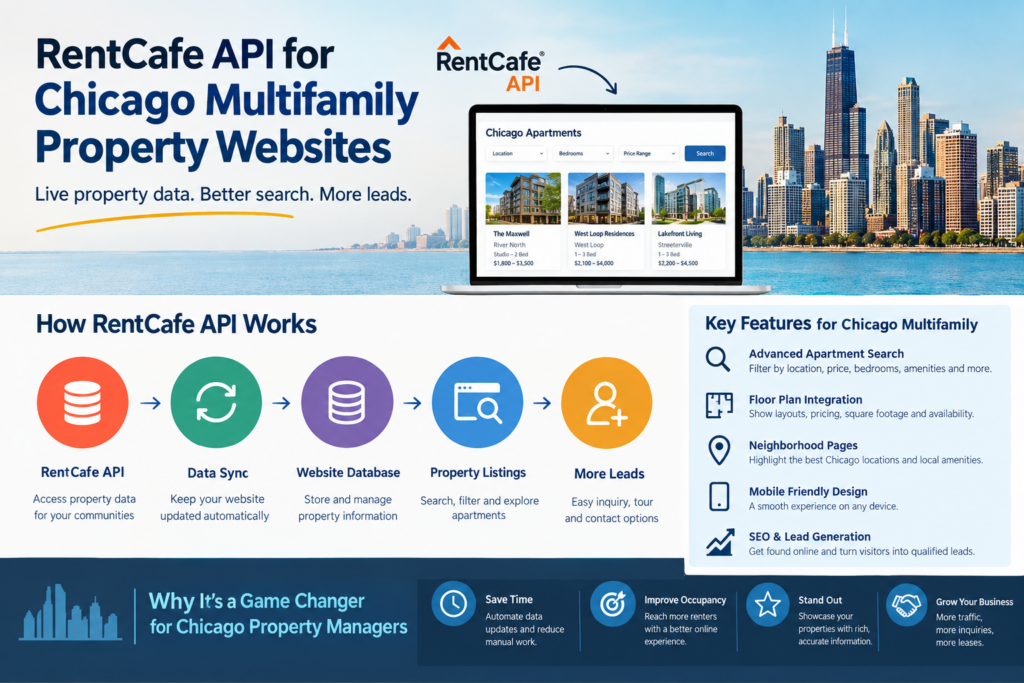
RentCafe → API → Website Database → Apartment Search → Property Pages → Leads

The website doesn’t need to expose the technical side to visitors. They simply see an apartment search experience where the information is organized in a way that makes sense.

For example, someone searching for a two-bedroom apartment in Chicago doesn’t care that an API successfully returned a JSON response.

They want to know:

Is it available?

How much does it cost?

How big is the apartment?

Where is the property?

What amenities are included?

Can I schedule a tour?

That’s what the website should focus on.


Why Chicago Multifamily Websites Need Better Property Search

Chicago is a competitive apartment market, and renters have plenty of choices.

Someone might be searching specifically for a luxury apartment in River North. Another person might care more about being close to the CTA. Someone else may want a pet-friendly two-bedroom apartment with parking.

A simple page showing a list of properties doesn’t really solve those problems.

A better multifamily website lets visitors narrow their choices using practical filters such as:

  • Chicago neighborhood or location
  • Apartment type
  • Number of bedrooms
  • Number of bathrooms
  • Monthly rent
  • Square footage
  • Availability
  • Pet-friendly options
  • Parking
  • Community amenities
  • Apartment features

This is one of the reasons multifamily website design Chicago projects should start with the renter journey instead of starting with colors, fonts and animations.

Design is important, of course. But if visitors can’t find the right apartment in a few clicks, a beautiful website won’t generate many leads.


How a RentCafe Property Listing Integration Works

A proper property listing integration is more than copying data from RentCafe and displaying it on a webpage.

Let’s say a property management company has 10 or 20 apartment communities around Chicago. Each community could have several floor plans and many individual units.

Keeping all that information manually updated would quickly become difficult.

With an API integration, the website can periodically synchronize supported information from RentCafe.

The process can be structured like this:

1. Connect to RentCafe API

The developer configures the required API authentication and establishes communication with the available RentCafe endpoints.

2. Map the Property Data

Information such as property names, addresses, floor plans, units, pricing, images and amenities is mapped into the website’s data structure.

3. Synchronize the Data

A scheduled process checks for changes and updates the website’s stored information.

4. Display Properties

The synchronized information is presented through apartment search pages, property pages and floor-plan sections.

5. Generate Leads

Visitors can request information, check availability, contact leasing or schedule a tour.

This is much more manageable than asking a marketing team member to manually update every apartment listing.


Build Property Pages That Actually Help Renters

One mistake I see with API-driven websites is treating the property page like a database record.

It shouldn’t feel that way.

A property page needs to sell the experience of living there while still providing accurate information.

A strong Chicago multifamily property page could include:

Property Overview

Explain what the property is and where it is located.

Photo Gallery

Show the exterior, apartments, amenities and common areas.

Floor Plans

Let visitors explore available layouts.

Pricing and Availability

Display supported current information from the property system.

Amenities

Highlight features that matter to renters.

Neighborhood

Explain what makes the surrounding Chicago location useful or attractive.

Lifestyle

Talk about restaurants, transportation, entertainment, parks and nearby attractions where relevant.

FAQ

Answer common questions before someone has to contact the leasing team.

Lead Form

Give visitors a simple way to ask a question or request availability.

The API supplies the data.

The website turns that data into a sales and marketing experience.


Make Floor Plans a Core Feature

For apartment websites, floor plans are often one of the most important parts of the decision-making process.

A renter may like the building. They may even like the photos. But eventually they’re going to ask:

What does the apartment look like?

How much is it?

How many square feet?

Is it available?

That’s why floor plans shouldn’t be buried somewhere inside a generic property description.

A useful floor-plan section can display:

  • Floor-plan name
  • Bedroom and bathroom count
  • Square footage
  • Starting rent
  • Available units
  • Availability date
  • Floor-plan image
  • Virtual tour, if available
  • Inquiry or tour CTA

If the necessary information is available through RentCafe API, the website can use synchronization to keep relevant information updated.

That gives renters a much better experience and reduces manual website maintenance.


RentCafe API and Chicago Local SEO

There is another major opportunity here: SEO.

A multifamily website can potentially rank for searches such as:

  • Chicago apartments
  • Chicago apartment rentals
  • 1 bedroom apartments Chicago
  • 2 bedroom apartments Chicago
  • luxury apartments Chicago
  • pet-friendly apartments Chicago
  • apartments with parking Chicago
  • apartments in River North
  • apartments in West Loop
  • apartments in Lincoln Park
  • multifamily apartments Chicago

But there is a right and wrong way to approach this.

I wouldn’t recommend generating thousands of pages automatically from every combination of filters.

For example, creating separate pages for:

/chicago-apartments-2-bedroom-pet-friendly-parking/

/chicago-apartments-2-bedroom-pet-friendly-no-parking/

/chicago-apartments-2-bedroom-no-pets-parking/

and hundreds of similar combinations can quickly create a low-quality website structure.

Instead, focus on useful pages that match genuine search intent.


Create Chicago Neighborhood Pages With Real Value

Chicago gives multifamily businesses a strong opportunity to build location-focused content.

Depending on the actual property portfolio, useful pages could focus on neighborhoods such as:

River North

West Loop

Lincoln Park

Lakeview

South Loop

Streeterville

Gold Coast

Logan Square

Wicker Park

Hyde Park

But don’t create neighborhood pages just because the keyword exists.

A useful neighborhood page should actually help someone make a rental decision.

You could include relevant apartment communities, available floor plans, transportation information, local amenities, nearby attractions and answers to common renter questions.

Then connect those pages naturally to the relevant property listings.

For example, someone reading about apartments in West Loop should be able to move directly to available West Loop properties.

If you’re developing a broader real estate website strategy, you can also link this article naturally to our complete real estate WordPress website guide.


Don’t Let the API Make Your Website Slow

This is one technical area that deserves attention before development starts.

A website could theoretically make API requests whenever a visitor loads a property page. But for a larger multifamily website, that’s not always the best approach.

A better architecture can often look like:

RentCafe API → Scheduled Synchronization → Website Database → Fast Front End

The website stores the relevant information locally and updates it according to a defined schedule.

This can reduce unnecessary API requests and provide a faster experience for visitors.

Other performance improvements can include:

  • Image optimization
  • WebP or modern image formats
  • Browser caching
  • CDN delivery
  • Lazy loading
  • Database optimization
  • Efficient search queries
  • Server-side caching

This becomes even more important when your website has hundreds of properties or units.


Mobile Experience Should Be a Priority

Apartment searches don’t only happen from desktop computers.

People search for apartments from their phones while commuting, during lunch breaks or while visiting different Chicago neighborhoods.

That means the mobile experience needs to be designed carefully.

Search filters should be easy to open.

Property cards should show the important information without requiring visitors to open several pages.

Images should load quickly.

And the contact or availability CTA should be easy to find.

A simple button such as Check Availability, Request a Tour or Ask About Pricing can make the next step much clearer.

You don’t need to push visitors aggressively. Just make it easy for someone who is interested to contact the leasing team.


Turn Apartment Search Traffic Into Qualified Leads

SEO traffic is useful, but traffic alone isn’t the goal.

For a multifamily property company, the real value comes when a website visitor becomes a leasing inquiry.

That’s why conversion elements should be built into the property experience.

For example:

Interested in this apartment? Check current availability or request more information from our leasing team.

A short form can collect:

  • Name
  • Email
  • Phone
  • Apartment preference
  • Desired move-in date

You can also provide different conversion options depending on the visitor’s intent:

Check Availability

Request a Tour

Ask About Pricing

Get Floor Plan Information

Contact Leasing

This is more natural than placing the same “Contact Us” button everywhere.


WordPress and RentCafe API: Can They Work Together?

Yes, WordPress can be a practical platform for a multifamily website, particularly when the marketing team needs to manage pages, blog content, FAQs, neighborhood guides and other marketing material.

The important part is how the RentCafe integration is developed.

For a larger project, you may need:

  • Custom post types
  • Custom database tables
  • API authentication
  • Scheduled data synchronization
  • Search and filtering
  • Property templates
  • Floor-plan templates
  • Availability handling
  • API error handling
  • SEO-friendly URLs
  • Caching

So this isn’t simply a matter of installing a WordPress theme and adding an API plugin.

The theme controls the visual presentation.

Custom development handles the business logic.

And the content and SEO strategy bring qualified visitors to the website.

If you’re planning a complete real estate website, you can also explore our guide on building a high-converting real estate website.


What to Look for in a RentCafe Developer

If RentCafe integration is an important part of your website, don’t hire a developer based only on their WordPress experience.

Ask how they plan to handle the API.

Where will the property data be stored?

How often will information synchronize?

What happens when an apartment becomes unavailable?

How will API errors be handled?

Can the search system work with the imported property data?

How will the website perform when the number of properties increases?

And perhaps the most useful question:

Have you worked on a real estate or multifamily API integration before?

A developer who understands both technology and the real estate business will generally be able to make better decisions about property structure, search, SEO and lead generation.


Build the Website Around the Renter, Not the API

It’s easy to get caught up in the technical side of an integration.

API credentials. Endpoints. Data fields. Synchronization. Databases.

All of that matters.

But your renter doesn’t care about any of it.

They want to find the right apartment, understand the property, see the floor plan, check availability and contact someone without making the process complicated.

That’s what the website should be designed around.

A well-planned RentCafe API Chicago multifamily website can combine live or synchronized property information with strong local SEO, useful neighborhood content, fast apartment search and conversion-focused property pages.

That combination is much more valuable than simply displaying a feed of apartment listings.

If your Chicago multifamily business already uses RentCafe and you’re considering a new website, redesign or custom property listing integration, it makes sense to plan the data structure and website architecture before development begins.

A little planning upfront can save a lot of development time later.

Need help building a RentCafe-powered multifamily website? We can help plan the WordPress architecture, property listing integration, apartment search, floor-plan experience, Chicago SEO and lead-generation features around your specific requirements.


FAQ: RentCafe API for Chicago Multifamily Property Websites

1. What is RentCafe API used for on a multifamily website?

RentCafe API can allow a website to exchange property-related information with RentCafe, depending on the API access available. This may include property details, floor plans, units, pricing, availability and other supported information.

2. Can I integrate RentCafe with a WordPress multifamily website?

Yes. WordPress can be connected to RentCafe through custom API development. The exact implementation depends on the available API documentation, endpoints, authentication and data requirements.

3. Can RentCafe API automatically update apartment availability?

Potentially, yes. If availability information is included in the API access, a scheduled synchronization process can update the website when apartment availability or other property information changes.

4. Can a Chicago multifamily website display RentCafe floor plans?

Yes. Where the relevant floor-plan information is available through the API, it can be displayed on property pages or dedicated floor-plan sections along with information such as apartment type, square footage, pricing and availability.

5. Can RentCafe API integration help with SEO?

It can support an SEO strategy by providing structured property information that can be displayed on useful, search-friendly pages. However, simply importing API data isn’t enough. The website should also provide unique content, neighborhood information, FAQs and other useful resources.

6. Can I create Chicago neighborhood pages for SEO?

Yes. Multifamily websites can create useful location-focused pages for Chicago neighborhoods such as River North, West Loop, Lincoln Park, Lakeview and South Loop when those locations are relevant to the property’s portfolio.

7. Should RentCafe API data be loaded every time someone visits the website?

Not necessarily. For larger websites, synchronizing relevant information into a local database can improve performance and reduce unnecessary API requests.

8. Can a RentCafe-powered website generate leasing leads?

Yes. Property inquiry forms, tour requests, availability requests, phone CTAs and other conversion elements can be added throughout the website to turn apartment search traffic into leasing opportunities.

9. How much does a RentCafe API multifamily website cost?

There is no single fixed price. The cost depends on factors such as the number of properties, API requirements, search functionality, website design, data synchronization, CRM integrations, SEO requirements and other custom features.

10. Do I need a developer experienced with RentCafe API?

If RentCafe integration is central to the project, working with a developer who understands API integrations as well as real estate and multifamily websites can help reduce technical problems and make the website easier to maintain.

How to Build a Chicago Apartment Website Using RentCafe API

How to Build a Chicago Apartment Website Using RentCafe API

Building an apartment website for Chicago is not really about putting a few property photos on a WordPress page and adding a “Contact Us” button. If the goal is to generate rental leads, the website needs to help people find the right apartment quickly—and give them a reason to contact you.

That is where a Chicago apartment website RentCafe API integration can become useful.

Instead of manually adding hundreds of apartments, floor plans, pricing details, amenities and availability, you can connect your website to property data through the RentCafe API and display relevant information automatically. The result can be a much more useful apartment listing website Chicago renters can actually search and use.

I’ve worked on real estate websites where the biggest problem wasn’t the design. It was keeping property information accurate while making the site easy for users and search engines to understand. API integration helps solve part of that problem, but the way you structure the website matters just as much.

Let’s look at how I would approach it.

What a Chicago Apartment Website Should Actually Do

Before touching the API, decide what the website needs to accomplish.

A good Chicago rental website should allow someone to browse properties, narrow results by location and budget, view apartment details, compare options and submit an inquiry without jumping through five different pages.

For example, a renter might be looking for:

  • Apartments in River North
  • 1-bedroom apartments in Chicago
  • Pet-friendly apartments
  • Apartments under $2,500
  • Apartments near public transportation
  • Luxury apartments in downtown Chicago
  • Apartments with parking
  • Available apartments near a specific neighborhood

The website should make those searches easy.

Your API integration then becomes the engine behind the property data while the website handles the user experience, SEO and lead generation.


Understanding the RentCafe API Integration

RentCafe provides property management and apartment marketing technology, and API access can be used to connect property information with another website or application, depending on the access and API arrangement available for the project.

This is an important point: don’t start development until you know exactly which RentCafe API endpoints and data fields you have access to.

Depending on the integration, your data may include information such as:

  • Property name
  • Property address
  • Apartment units
  • Floor plans
  • Bedroom and bathroom count
  • Rent
  • Square footage
  • Availability
  • Amenities
  • Property images
  • Community information
  • Unit details

A developer can then map this information into your website’s database.

For a WordPress project, I normally wouldn’t recommend making the website request the external API every time someone opens a property page. That can make the website slower and creates unnecessary dependency on the external service.

A better approach is often:

RentCafe API → Scheduled Sync → WordPress Database → Website

The website displays locally stored information, while a scheduled process periodically checks for changes.

That architecture is much easier to manage.


Building the Website Architecture

For a Chicago apartment website, I would separate the data into logical components instead of treating every property as a normal blog post.

A simple structure could look like this:

Properties

Each property represents an apartment community.

Floor Plans

Each property can have multiple floor plans such as studio, 1-bedroom, 2-bedroom and 3-bedroom apartments.

Units

Individual available units can contain rent, availability date, square footage, floor and other information.

Amenities

Amenities can be attached to the property or individual units.

Locations

Chicago neighborhoods can be handled separately so the website can create useful location pages.

This structure becomes particularly powerful for SEO.

Instead of having only /apartments/, you could eventually have pages targeting searches such as:

/chicago-apartments/

/chicago-1-bedroom-apartments/

/apartments-river-north-chicago/

/apartments-lincoln-park-chicago/

/luxury-apartments-chicago/

Obviously, you don’t want to generate thousands of thin pages just because the API gives you thousands of possible combinations. Every indexable page should have a genuine purpose and useful content.


How the Chicago Apartment Search Should Work

This is where many real estate websites either become useful—or frustrating.

The search interface should be simple.

A visitor could start with:

Location → Bedrooms → Price → Amenities → Availability

Then the website returns matching properties.

For example:

Chicago → 2 Bedrooms → $2,000–$3,000 → Pet Friendly

The results page can display apartment cards containing the property image, name, neighborhood, rent range, bedrooms, bathrooms and a clear button such as View Apartments or Check Availability.

Don’t overload the first screen with 30 filters.

People generally want to narrow down their options quickly. You can put advanced filters behind an “More Filters” option.

For larger Chicago markets, map-based search can also be useful, particularly when location is an important part of the buying—or in this case renting—decision.


Creating Property Pages That Generate Leads

The property detail page is where your API integration and marketing strategy need to work together.

A basic property page shouldn’t just dump API fields onto the screen.

Instead, structure it like a real apartment marketing page.

Start with:

Property Name

Chicago neighborhood/location

Starting rent

Available floor plans

Photos

Amenities

Apartment features

Nearby attractions and transportation

Availability

Then give the visitor a clear next step.

For example:

Interested in this Chicago apartment?
Request current pricing and availability from our team.

The lead form can ask for basic information such as name, email, phone and preferred apartment type.

If you’re building the website for an apartment locator, property manager or real estate company, these leads can become much more valuable than simply sending visitors to an external listing platform.


Using RentCafe API Data Without Creating an SEO Mess

This is one of the areas I would pay close attention to.

API-driven websites can create thousands of URLs very quickly.

Imagine you have 500 properties, 20 floor plans per property and multiple availability combinations. If every variation becomes an indexable URL, you can end up with a huge collection of near-duplicate pages.

Google doesn’t need 50 pages that say essentially the same thing.

Instead, create strong landing pages around genuine search demand.

For example:

Chicago Apartment Listing Website

Your main apartment search page can target broader Chicago apartment searches.

Then create useful neighborhood pages around locations that actually matter to renters.

A neighborhood page might include:

  • Local apartment listings
  • Typical apartment types
  • Price ranges
  • Transportation information
  • Local amenities
  • Nearby neighborhoods
  • Frequently asked questions

This gives the page context beyond the API data.

If you’re also working on the broader SEO strategy, a guide such as real estate website SEO strategies can help connect informational content with your apartment listings.


Making the Website Fast

API integration doesn’t automatically mean a slow website.

The problem usually comes from poor implementation.

I would recommend storing synchronized property information locally and using scheduled updates rather than making repeated API calls for every visitor.

You can also use:

  • Image compression
  • WebP images
  • Browser caching
  • CDN delivery
  • Lazy loading
  • Database indexing
  • Lightweight search queries
  • Server-side caching

The goal is simple: the visitor shouldn’t have to wait for several external API requests before seeing apartments.

A fast website also creates a better experience on mobile, which matters enormously for rental searches.


Mobile Experience Is Not Optional

A lot of apartment searches happen while people are away from their computers.

Someone might be sitting on the train, browsing apartments on their phone, and saving a few properties to investigate later.

Your Chicago apartment website needs to work properly on a small screen.

Search filters should be easy to open.

Apartment cards should be readable.

Images shouldn’t push the important information halfway down the page.

And the inquiry button should be easy to find.

I usually recommend keeping a strong mobile CTA visible on property pages—something like Check Availability or Request Information.

Small details like that can make a surprisingly big difference in lead conversion.


Why You May Want a RentCafe Developer in Chicago

If your project depends heavily on RentCafe data, hiring a generic WordPress developer isn’t always enough.

A RentCafe developer Chicago project requires someone who understands both sides of the equation: API integration and real estate websites.

The developer needs to think about things like API authentication, data mapping, synchronization, error handling, database structure, property URLs, availability changes and website performance.

For example, what happens if an apartment that was available yesterday is rented today?

The website shouldn’t continue showing it as available indefinitely.

Your synchronization system needs to update the record, remove outdated availability or mark it appropriately.

That is the kind of practical issue that isn’t obvious when you’re simply designing the homepage.


Adding Chicago Neighborhood SEO

Chicago gives you a lot of opportunities for location-based SEO.

Depending on your actual inventory, you might build useful pages around areas such as:

  • River North
  • Lincoln Park
  • West Loop
  • South Loop
  • Lakeview
  • Streeterville
  • Gold Coast
  • Wicker Park
  • Logan Square
  • Hyde Park

Don’t create these pages just for keywords.

If you have apartments in River North, build a genuinely useful River North apartment page. Show relevant listings, explain the area, discuss transportation and link to related properties.

This creates a much stronger apartment listing website Chicago than a collection of automatically generated pages.


Internal Linking That Makes Sense

Internal links should help users move around the site, not just exist because an SEO checklist says you need them.

For example, from a Chicago apartment guide, you could naturally link to:

Chicago apartment search

Best Chicago neighborhoods for renters

Chicago real estate website development

And from a neighborhood page, link back to relevant apartment listings.

You can also create supporting content around questions renters actually ask, such as how much a 1-bedroom apartment costs in Chicago, which neighborhoods are best for commuting, or what amenities are common in luxury apartment buildings.

That combination of useful content + live listings gives the website more depth.


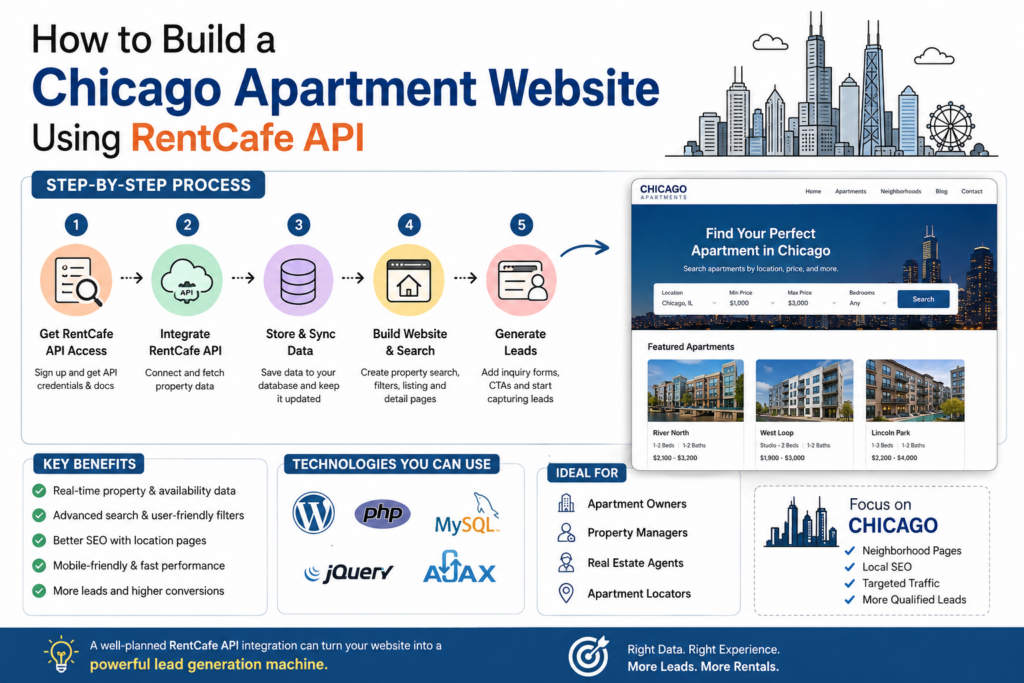
A Practical RentCafe API Development Workflow

A project like this can be broken down into a fairly straightforward process.

1. Get API documentation and credentials

Understand available endpoints, authentication and usage limits before development starts.

2. Define the website data structure

Decide how properties, units, floor plans, amenities and locations will be stored.

3. Build the API integration

Create the connection between RentCafe and your website.

4. Build the synchronization system

Set up scheduled imports and updates.

5. Create the apartment search

Add filters, sorting and pagination.

6. Build property and floor-plan pages

Make the API information useful and readable instead of displaying raw data.

7. Add SEO architecture

Create optimized category, neighborhood and property URLs.

8. Add lead generation

Use inquiry forms, calls to action and conversion tracking.

9. Test everything

Check API failures, unavailable units, duplicate records, mobile layouts, speed and forms.

10. Launch and monitor

After launch, monitor search performance, leads and data synchronization rather than considering the project “finished.”


Turning Apartment Traffic Into Real Leads

Getting visitors is only half the job.

If someone lands on a property page and can’t figure out what to do next, you’ve wasted the opportunity.

Give them several natural ways to contact you:

Check Availability

Request Pricing

Schedule a Tour

Ask a Question

Get Apartment Recommendations

You can also capture broader leads from visitors who aren’t ready to contact you about a specific property.

For example:

Not sure which Chicago neighborhood is right for you? Tell us what you’re looking for and we’ll help narrow down the options.

That’s a much softer CTA than “Contact Us Now,” and it gives the visitor a reason to submit the form.


Final Thoughts

A successful Chicago apartment website RentCafe API project isn’t simply an API integration.

The API provides the property data, but your website has to turn that data into something useful.

The strongest setup combines accurate apartment information, fast search, neighborhood-focused SEO, mobile-friendly property pages and a simple lead-generation process.

If you’re building an apartment listing website for Chicago and already have RentCafe access, the next step is to map out the API data and website architecture before starting the actual development. That can save a lot of rework later.

And if you’re planning to build a real estate website around WordPress, you may also want to explore a complete real estate WordPress website guide before choosing the final architecture.

Need a Chicago apartment website connected to RentCafe? A properly planned integration can give you a website that isn’t just displaying apartments—it can become a real lead-generation channel for your business.


FAQ: Chicago Apartment Website Using RentCafe API

1. Can I build a Chicago apartment website with RentCafe API?

Yes, provided you have the appropriate RentCafe API access and documentation. The API can be integrated with WordPress or a custom application to synchronize property and apartment information.

2. Can RentCafe API show apartment availability?

The available data depends on the specific API access and endpoints provided for your account. If availability information is exposed, it can be synchronized with your website and displayed to visitors.

3. Can I build the website with WordPress?

Yes. WordPress can work well for this type of project when the API integration is developed properly. Property data can be stored in a custom database structure or custom post type architecture, depending on the requirements.

4. How often should apartment data be synchronized?

It depends on how frequently availability and pricing change. For active rental inventories, scheduled synchronization several times per day may be more appropriate than a weekly update.

5. Can I create Chicago neighborhood pages?

Yes, and this can be particularly useful for SEO. Pages targeting neighborhoods such as River North, Lincoln Park, West Loop and South Loop can combine relevant apartment listings with genuinely useful local information.

6. Can the website include apartment search filters?

Yes. Filters can be created for factors such as location, bedrooms, bathrooms, price, square footage, amenities and availability, depending on the data available through the API.

7. Can RentCafe data be used for SEO?

API data can be displayed on SEO-friendly pages, but simply importing the same data into hundreds of pages isn’t enough. The website should add unique, useful content and avoid creating large numbers of duplicate or thin pages.

8. How much does a RentCafe apartment website cost?

The cost varies considerably depending on API requirements, number of properties, search functionality, design, CRM integration, automation and whether the project uses WordPress or a custom application.

9. Should I hire a RentCafe developer for the project?

If RentCafe integration is central to the website, working with a developer who understands API integrations and real estate websites can reduce technical problems and make the project easier to maintain.

10. Can the website generate apartment leads?

Yes. Property inquiry forms, tour requests, availability requests, phone CTAs and recommendation forms can all be integrated into the website to turn apartment search traffic into leads.


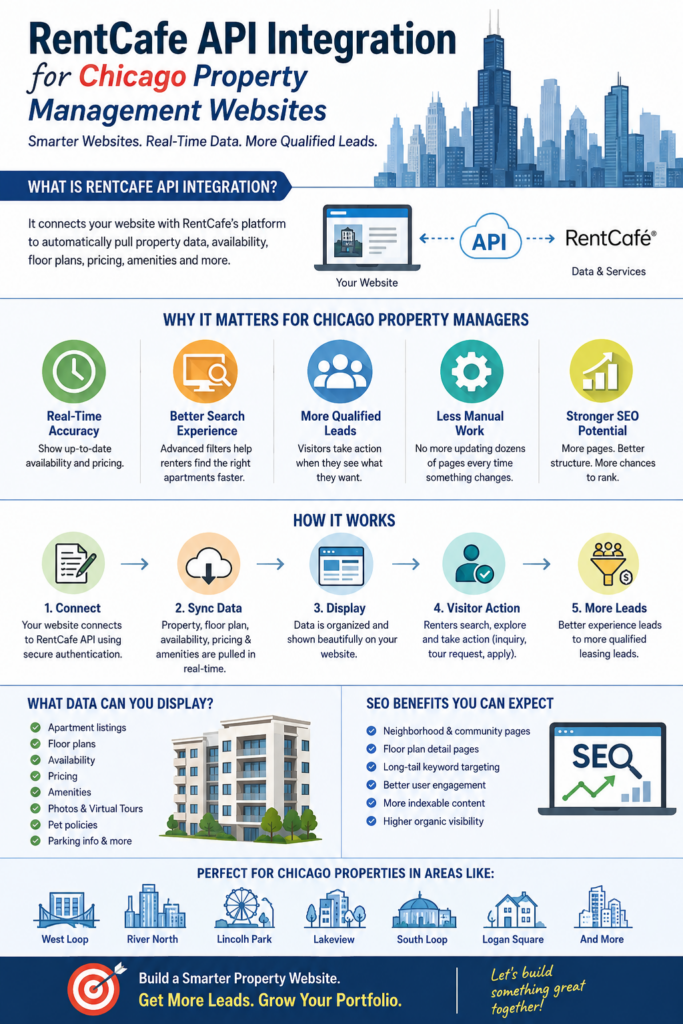
RentCafe API Integration for Chicago Property Management Website

RentCafe API Integration for Chicago Property Management Websites


If you manage apartment communities in Chicago, your website has one job that matters more than flashy design: help renters find the right property and take the next step quickly.

That sounds simple until you have dozens of apartment communities, constantly changing availability, pricing, floor plans, amenities, photos, and leasing information.

This is where RentCafe API for Chicago multifamily websites can become useful.

Instead of maintaining apartment information manually across a Chicago property management website, an integration can connect your website with the data and services available through the RentCafe ecosystem, depending on the API access and capabilities provided for your account. The goal is straightforward: make property information easier to manage while giving prospective renters a smoother online experience.

For Chicago property managers, developers, and real estate companies, this can be especially valuable because renters often compare multiple communities before submitting an inquiry or scheduling a tour.

A well-built integration can help turn that comparison process into an opportunity for your business.

Why Chicago Property Management Websites Need Better Property Data

Chicago’s rental market is competitive. A prospective tenant might search for apartments in River North, West Loop, South Loop, Lincoln Park, Lakeview, Logan Square, or neighborhoods farther outside downtown.

They are not just looking for a nice-looking website.

They want answers.

What apartments are available? What’s the rent? Which floor plans are offered? Are pets allowed? What amenities are available? Is parking offered? Can they schedule a tour? Can they apply online?

When those answers are difficult to find, people leave the website.

The challenge for property management companies is keeping all of that information accurate without turning website management into a full-time administrative task.

A Chicago apartment website using RentCafe API connected to a centralized property data source can make the process considerably easier.

Rather than asking a marketing employee or developer to update every apartment page whenever something changes, the website can be designed to retrieve and display relevant property information through an appropriate integration.

What Is RentCafe API Integration?

At a practical level, RentCafe API integration means connecting a website or application with available RentCafe data or functionality through an authorized API connection.

The exact data and operations available depend on the RentCafe products, account permissions, API access, and documentation provided to the property management company.

A typical integration project may involve connecting property information with a website’s:

  • Apartment listings
  • Floor plans
  • Availability information
  • Pricing
  • Community details
  • Amenities
  • Property images or related content
  • Leasing or inquiry workflows
  • Search and filtering features

The important part isn’t simply “connecting an API.”

The real value comes from designing the website around the data.

For example, a renter searching for a two-bedroom apartment under a certain price should be able to find relevant options without clicking through ten different pages.

That is where good apartment website development Chicago services can make a difference.

How RentCafe API Integration Can Improve a Chicago Apartment Website

A property website should behave more like a useful leasing tool and less like an online brochure.

Imagine a renter lands on your website and immediately sees available apartments. They select two bedrooms, choose a price range, review floor plans, check amenities, and then request a tour.

That’s a much better journey than forcing them to call the leasing office just to find out whether a particular floor plan is currently available.

1. Reduce Manual Property Updates

Apartment availability changes constantly.

Units get leased. New units become available. Pricing changes. Move-in dates change.

If your team has to update the website manually every time something changes, information can become outdated surprisingly quickly.

An API-based approach can reduce repetitive data entry by allowing the website to retrieve relevant information from the connected system.

That means your team can spend less time copying information between platforms and more time handling actual leasing activity.

2. Create Better Apartment Search Experiences

Chicago renters have very specific requirements.

Someone working downtown might prioritize proximity to the Loop. Another renter may care more about parking or pet-friendly policies. A family may need multiple bedrooms and specific amenities.

A properly designed website can use available property data to build useful filters around factors such as:

  • Bedroom count
  • Bathroom count
  • Price range
  • Floor plan
  • Availability
  • Community
  • Amenities
  • Move-in requirements

This improves user experience while also helping visitors find relevant inventory faster.

3. Build Individual Property and Floor Plan Pages

For companies managing multiple communities, one of the biggest website challenges is creating useful pages for every property without duplicating thin content.

API-connected websites can be structured around individual communities, floor plans, and available apartments.

For example, a property page could contain a community overview followed by available floor plans. A renter could then move from the floor plan to current availability and finally to a leasing inquiry.

From an SEO perspective, this also creates opportunities to target more specific searches.

Instead of trying to rank one generic page for “Chicago apartments,” a website can potentially create useful content around specific properties, neighborhoods, floor plans, and apartment-related searches.

The pages still need unique, valuable content. Simply displaying database fields isn’t enough.

RentCafe API Integration Chicago: SEO Benefits Worth Considering

API integration itself does not automatically make a website rank higher.

That’s an important distinction.

Google doesn’t award rankings just because a website uses an API.

The SEO advantage comes from what you build with the data.

A well-planned integration can support a larger website architecture where users can discover relevant property pages, floor plans, amenities, and location-based content.

For example, a Chicago property management company could create helpful content around searches such as:

Apartments in Chicago

Luxury apartments in Chicago

Apartments near the Chicago Loop

Pet-friendly apartments in Chicago

Apartments in West Loop

Apartments in River North

Chicago apartment floor plans

These pages should provide genuine value rather than simply repeating property data.

A strong strategy combines structured property information with original content about the community, neighborhood, leasing process, amenities, transportation, and other questions renters actually have.

Long-Tail Opportunities for Chicago Property Managers

One of the biggest missed opportunities on apartment websites is ignoring long-tail search terms.

Someone searching “apartments in Chicago” is still researching.

Someone searching “two bedroom apartment with parking in West Loop Chicago” has a much clearer intent.

Your website should be able to support both.

Depending on the properties you manage, your SEO strategy could target combinations of:

  • Chicago apartment rentals
  • Chicago apartment communities
  • Luxury apartment buildings Chicago
  • Affordable apartments Chicago
  • Two-bedroom apartments Chicago
  • Pet-friendly apartments Chicago
  • Apartments with parking Chicago
  • Apartments near downtown Chicago
  • West Loop apartment rentals
  • River North apartments
  • Lincoln Park apartments
  • Lakeview apartments
  • South Loop apartments
  • Chicago apartment floor plans
  • Chicago property management companies

The trick is not creating hundreds of nearly identical pages.

Create pages when you have something genuinely useful to say.

What a Good Integration Project Should Include

A successful apartment website development Chicago project should start with the business requirements, not the API.

Before development begins, determine what information the website needs and what the leasing team actually wants visitors to do.

For example, ask:

What properties need to be displayed?

Which property fields are available?

How frequently should information be refreshed?

What happens when a property becomes unavailable?

How should floor plans be displayed?

What filters should renters have?

Where should inquiries go?

How should mobile users interact with the listings?

What happens when API data is unavailable?

That last question gets overlooked.

A good integration needs sensible error handling, caching where appropriate, performance optimization, and a fallback experience. Your website shouldn’t become unusable simply because an external service temporarily has an issue.

RentCafe API Integration and Lead Generation

The end goal isn’t just showing apartments.

It’s generating qualified leasing leads.

A visitor who finds the right apartment should have a clear next action.

That might be:

Schedule a tour

Request information

Check availability

Apply now

Contact leasing

Don’t hide these actions at the bottom of a page.

Place them naturally throughout the renter journey.

For example, after displaying a floor plan, provide an obvious way to ask about that specific apartment. If someone is viewing a community page, make it easy to schedule a tour.

Small changes like these can have a meaningful impact on conversion rates.

And because the website is handling more of the initial research process, leasing staff can spend more time with prospects who are already interested.

Choosing the Right Chicago Web Development Partner

RentCafe API integration services in Chicago isn’t just a web design project.

It combines website development, API integration, database or data-handling logic, user experience, SEO, and lead-generation considerations.

That’s why it’s worth choosing a developer who understands both sides of the project.

A beautiful apartment website that displays outdated availability isn’t very useful.

Likewise, a technically impressive API integration with a confusing user interface won’t generate many leads.

The strongest projects connect the technical work with the actual leasing workflow.

If you’re already planning a new site, you may also want to review your broader RentCafe API website development for Chicago property managers strategy before development begins. This can help you decide which pages, search features, and conversion paths should be included from the start.

Similarly, if your current website receives traffic but produces few inquiries, consider reviewing your apartment website conversion optimization strategy rather than assuming a complete redesign is the answer.

Is RentCafe API Integration Worth It for a Chicago Property Management Company?

For companies managing a substantial number of apartments or multiple communities, it can be worth considering.

The biggest benefit isn’t the API itself.

It’s the ability to create a website that connects property information with a better renter experience.

Instead of treating the website as a static marketing asset, you can build it as part of the leasing process.

That can mean easier inventory management, better apartment discovery, more useful property pages, stronger long-tail SEO opportunities, and a clearer path from Google search to leasing inquiry.

Of course, the right approach depends on your RentCafe setup, available API access, website platform, property portfolio, and business requirements.

Before development, confirm the available API capabilities and data permissions rather than assuming every RentCafe feature is accessible through an API.

Ready to Improve Your Chicago Property Management Website?

If your Chicago property management website is still relying heavily on manual apartment updates, disconnected listing systems, or a poor search experience, it may be time to rethink the setup.

A properly planned RentCafe API integration Chicago project can bring property data, website functionality, SEO, and lead generation together in one smoother experience.

The best place to start is usually a technical and business review: what data you have, what your website needs, what renters are searching for, and where your current leasing funnel is losing prospects.

If you’re considering a RentCafe-connected website for Chicago properties, a developer can review your requirements and map out the integration before any major development work begins.


Frequently Asked Questions

What is RentCafe API integration for a Chicago property management website?

RentCafe API integration connects an authorized website or application with available RentCafe data or functionality so relevant property information can be displayed or used within the website. Available capabilities depend on the account, permissions, products, and API access provided.

Can RentCafe API integration display apartment availability?

It can, where the relevant availability data and API access are provided for the specific RentCafe setup. The website can then be designed to present available inventory in a renter-friendly format.

Can a Chicago apartment website show floor plans through an API?

Potentially, yes. If the required floor-plan information is available through the authorized integration, developers can design pages that organize floor plans and related apartment information for visitors.

Does RentCafe API integration improve SEO?

The integration itself is not an SEO ranking factor. However, property and availability data can support a stronger website structure, useful apartment pages, better search experiences, and more relevant long-tail content when implemented correctly.

How can API integration help Chicago property managers generate leads?

It can make it easier for renters to find relevant apartments and move toward actions such as requesting information, checking availability, scheduling a tour, or applying. A good conversion-focused design is still essential.

Is API integration useful for companies managing multiple Chicago properties?

Yes, it can be particularly useful when a company has multiple communities or a large amount of changing apartment information. Centralizing or automating appropriate data flows can reduce repetitive website maintenance.

How much does RentCafe API integration cost?

There isn’t one standard price. Cost depends on the website platform, API requirements, available data, number of properties, custom Chicago property search website functionality, design, testing, and other development requirements. A technical review is the best way to estimate the project accurately.

Can RentCafe API integration work with an existing WordPress website?

It may be possible, depending on the available API access and the existing WordPress setup. A developer would need to review the API documentation, authentication requirements, website architecture, and desired functionality before recommending an implementation.

Can this strategy target neighborhoods such as River North or West Loop?

Yes. A Chicago property website can create useful neighborhood-focused pages when the company has relevant properties and genuinely useful information for renters. Pages should offer more than simply changing the neighborhood name on duplicate content.

Should I build a custom apartment website around RentCafe data?

For companies with complex property portfolios, custom search requirements, multiple communities, or specific lead-generation goals, a custom solution may make sense. The right choice depends on your business and technical requirements.

Real Estate Website Design Tips for More Leads (2026 Guide That Actually Works)

Real Estate Website Design Tips for More Leads (2026 Guide That Actually Works)


Introduction

Let’s not sugarcoat this—most real estate websites don’t fail because of traffic.

They fail because they don’t convert visitors into leads.

You can spend money on ads, SEO, social media… but if your website isn’t designed the right way, people will visit and leave without doing anything.

No inquiry. No call. No deal.

And this is exactly why many agents in the USA are now looking for a real estate website developer USA who understands not just design—but conversions.

Because today, your website isn’t just a portfolio.
It’s your lead generation system.


What makes a real estate website actually generate leads?

Before jumping into tips, let’s clear one thing.

A high-converting website is not about:

  • fancy animations
  • heavy design
  • too many features

It’s about clarity + speed + direction.

A good real estate website:

  • tells users what to do
  • makes it easy to take action
  • builds trust quickly

That’s it.


Why your real estate website is not converting visitors

This is something I see all the time.

People say:
👉 “My website looks good, but I’m not getting leads.”

Here’s what’s usually going wrong:

1. No clear call-to-action

Users don’t know what to do next.


2. Too much distraction

Sliders, animations, popups—everything at once.

Instead of helping, it confuses users.


3. Poor mobile experience

More than 70% of users are on mobile.
If your site isn’t smooth there—you’re losing leads.


4. No trust elements

No reviews, no testimonials, no proof.

Why would someone contact you?


5. Weak structure

The website looks fine—but it doesn’t guide users.


How to improve real estate website conversion rate

Now let’s get practical—these are the things that actually work.


1. Keep your homepage simple (seriously)

Your homepage should answer 3 things immediately:

  • What do you offer?
  • Where do you operate?
  • What should the user do next?

If this is not clear in 5 seconds, users leave.


2. Use strong and clear CTAs

Buttons like:

  • Get Property Details
  • Book a Visit
  • Schedule a Call

should be visible without scrolling.

Not once—multiple times.


🔥 CTA SECTION (High Conversion)

If your website is not generating leads right now, you are losing potential clients every day.

👉 Hire a professional real estate website developer in the USA and turn your website into a lead machine.


3. Focus on mobile-first design

Don’t design for desktop first.

Start with mobile:

  • faster loading
  • simple layout
  • easy navigation

Because that’s where most of your users are.


4. Speed matters more than design

A slow website kills everything:

  • SEO
  • user experience
  • conversions

If your site takes more than 3 seconds to load, users leave.


5. Use landing pages instead of sending traffic to homepage

This is one of the biggest mistakes.

If you’re running ads or targeting keywords like:

  • homes in New York
  • flats in California

Send users to a dedicated page, not your homepage.


6. Work with the right developer (this matters a lot)

Not all developers understand real estate.

You need someone who knows:

  • lead generation
  • IDX integration
  • MLS data
  • SEO structure

That’s why many businesses now prefer:

  • hire real estate website developer USA
  • wordpress real estate website developer USA

Because they understand both tech + marketing.


7. Use IDX and MLS integration properly

If you are in the USA, IDX and MLS are critical.

An IDX real estate website developer helps you:

  • show live property listings
  • improve user experience
  • keep content updated automatically

This also improves SEO.


8. Build trust immediately

Add:

  • client testimonials
  • reviews
  • project success stories

Even small trust signals increase conversions.


9. Optimize your property listings

Your listings should not just display—they should sell.

Include:

  • high-quality images
  • clear pricing
  • features
  • location benefits

10. Add multiple contact options

Don’t rely on one method.

Use:

  • forms
  • call buttons
  • WhatsApp (if applicable)

Make it easy for users to reach you instantly.


Real estate website design for realtors (what actually works in USA)

If you’re targeting the US market, expectations are higher.

Users expect:

  • fast websites
  • clean design
  • accurate data
  • easy navigation

That’s why many agents invest in:

  • custom real estate website development USA
  • real estate web design company USA

Because template-based sites often fail to convert.


Choosing the best real estate website developer for agents USA

This decision can make or break your results.

Look for:

  • experience in real estate
  • knowledge of IDX/MLS
  • SEO understanding
  • conversion-focused design

Avoid developers who only focus on design.


Affordable real estate website design USA (what to expect)

Many people think:
👉 “Affordable = low quality”

That’s not always true.

A good developer can create:

  • fast
  • optimized
  • lead-focused website

without overcharging.

The key is choosing the right person or agency.


Real estate lead generation website services (what you actually need)

A complete solution includes:

  • website design
  • SEO
  • landing pages
  • lead capture system
  • CRM integration

Not just design.

Because design alone doesn’t generate leads.


How to generate leads from real estate website USA

Let’s simplify it:

To generate leads, your website needs:

  • traffic (SEO or ads)
  • conversion (design + CTA)
  • trust (reviews + content)

If even one of these is missing, results drop.


Quick reality check

Most websites fail because:

  • they look good but don’t convert
  • they have traffic but no strategy
  • they are built without understanding users

Fix these—and results change fast.


FAQ

Why is my real estate website not generating leads in the USA?

It usually happens due to poor design, lack of SEO, slow speed, and weak conversion strategy.


Should I hire a real estate website developer in the USA?

Yes, especially if they understand IDX, MLS, SEO, and lead generation strategies.


What is the best way to improve website conversion rate?

Focus on clear CTAs, fast loading speed, mobile optimization, and better user experience.


Do I need IDX integration for my website?

Yes, if you operate in the USA, IDX helps display updated property listings and improves user experience.


Final thoughts

At the end of the day, your website should do one thing—generate leads consistently.

Not just exist.

If your website is not converting right now, it’s not a traffic problem… it’s a strategy problem.

Fix the structure, improve the experience, and guide users properly—and you’ll start seeing results.


Final CTA

If you’re serious about growing your real estate business, don’t settle for a basic website.

👉 Work with a real estate website developer in the USA who understands lead generation, SEO, and conversion—and turn your website into a powerful business asset.


How to Generate Leads from Property Website (2026 Guide)

How to Generate Leads from Property Website (2026 Guide)

Introduction

Let’s be honest—just having a property website today is not enough.

A lot of real estate businesses build a website expecting leads to come automatically. But in reality… nothing happens.

No calls. No inquiries. No site visits.

If that sounds familiar, the problem is not your website—it’s how it’s structured, optimized, and used.

In this guide, I’ll show you what actually works in 2026 to turn your property website into a consistent lead generation system.


How to generate leads from a property website?

A property website generates leads by combining SEO, landing pages, fast user experience, and strong call-to-action elements. The goal is simple: convert visitors into inquiries through forms, calls, or WhatsApp.


Why your property website is not generating leads

Before fixing the problem, you need to understand what’s going wrong.

1. No clear action for users

If visitors don’t know what to do next, they won’t take action.


2. Poor mobile experience

Most users are on mobile. If your site is slow or confusing, they leave immediately.


3. No SEO = no traffic

Without visibility on Google, your website won’t get visitors—so no leads.

👉 If you haven’t worked on this yet, you should improve your real estate SEO strategy (internal link)


4. Weak property presentation

Low-quality images or incomplete details reduce trust instantly.


5. No proper lead capture system

No forms, no WhatsApp, no call buttons = missed opportunities.


10 proven ways to generate leads from your property website

Let’s get practical.


1. Design your website for conversion (not just looks)

A clean, simple layout works better than a fancy design.

Focus on:

  • clear messaging
  • easy navigation
  • visible contact options

2. Add strong call-to-action (CTA) everywhere

Don’t assume users will figure things out.

Use buttons like:

  • Get Price Details
  • Book Site Visit
  • Request Callback

Place them:

  • on homepage
  • property pages
  • sticky header

🔥 CTA (Add This Section in Your Page)

If your website is not generating leads right now, you’re losing potential clients every day.

👉 Get a free audit of your property website and find out exactly what’s stopping your conversions.


3. Use dedicated landing pages

Sending traffic to your homepage is a mistake.

Instead, create focused pages for:

  • specific projects
  • locations (Noida, Gurgaon, Greater Noida)

A good landing page converts much better.


4. Use SEO to get consistent traffic

SEO brings free, high-intent visitors.

Target keywords like:

  • property website leads
  • real estate lead generation
  • flats in Noida / Gurgaon

👉 You can also improve this with proper real estate website development (internal link)


5. Improve your property listings

Think like a buyer.

Your listing should answer:

  • What is the price?
  • What are the features?
  • Why this location?

Use:

  • high-quality images
  • clear descriptions
  • amenities
  • location advantages

6. Add simple lead capture forms

Don’t overcomplicate forms.

Just ask:

  • Name
  • Phone
  • Email

Short forms = higher conversion.


7. Add WhatsApp and call buttons

Many users prefer instant communication.

Adding WhatsApp can significantly increase inquiries.


8. Improve website speed

A slow website kills both SEO and conversions.

Fix:

  • image size
  • hosting quality
  • unnecessary plugins

9. Run ads for faster results

If you want quick leads:

  • Google Ads
  • Facebook Ads
  • Instagram Ads

👉 Always send traffic to landing pages (not homepage)


10. Build trust with proof

Real estate is trust-based.

Add:

  • testimonials
  • reviews
  • past project success

How to generate real estate leads in Noida, Gurgaon & Greater Noida

If you are targeting local markets, this is important.

Use:

  • location-based pages
  • local keywords
  • area-specific content

Examples:

  • flats in Noida
  • property dealers Gurgaon
  • real estate projects Greater Noida

👉 Local SEO brings high-conversion traffic


What actually works in 2026 (quick summary)

Most websites fail because they focus only on design.

What works is:

  • SEO + traffic
  • landing pages
  • fast experience
  • strong CTA

Simple—but powerful.


FAQ

How can I generate leads from my property website?

By combining SEO, landing pages, fast loading speed, and strong call-to-action buttons.


Why is my real estate website not getting leads?

Common reasons include poor SEO, slow speed, weak design, and no clear conversion strategy.


Is SEO important for property websites?

Yes, SEO brings organic traffic from Google, which increases lead opportunities.


Final CTA (Very Important)

Your website should not just exist—it should generate business.

If it’s not bringing leads right now, something is missing.

👉 Get a professional review of your website and start turning visitors into real inquiries.

Real Estate WordPress: Complete Guide to Build a High-Converting Property Website (2026)

Real Estate WordPress: Complete Guide to Build a High-Converting Property Website (2026)


Introduction

Let’s be real for a second—most real estate websites don’t fail because of design. They fail because they don’t generate leads.

And in 2026, that’s a serious problem.

People are no longer calling brokers randomly or walking into offices. They search, compare, scroll, and decide—all online. If your website doesn’t convince them in those few minutes, they’re gone… probably to your competitor.

That’s exactly where a properly built WordPress real estate website makes a difference.

Not just a “nice-looking site”… but something that actually works like a lead machine.


So what exactly is a real estate WordPress website?

In simple language, it’s your online property showroom—but smarter.

Instead of just listing properties, it helps people:

  • find what they want faster
  • trust you quicker
  • and most importantly… contact you

A good one doesn’t just show properties. It quietly pushes visitors toward taking action.


Why almost everyone is choosing WordPress now

I’ve seen agencies spend lakhs on custom websites… and still struggle.

At the same time, some agents using WordPress are generating consistent leads.

Why?

Because WordPress keeps things practical.

You don’t need to depend on a developer every time you want to:

  • add a new property
  • update pricing
  • create a new landing page

You can literally handle most of it yourself.

And from an SEO point of view, it already gives you a solid base. Google understands WordPress sites well—which helps when you’re trying to rank for terms related to real estate.


The part most people get wrong (features that actually matter)

Here’s where most websites mess up—they focus on design, not usability.

Let me simplify what actually matters:

1. Property search should feel effortless

If a user has to struggle to find a property, they won’t try harder… they’ll just leave.

Filters like location, price, and property type should be smooth and fast. No confusion.


2. If you don’t capture leads, nothing else matters

This is the biggest mistake I see again and again.

People spend money on design… but forget forms.

Every property page should give users an easy way to:

  • ask questions
  • schedule a visit
  • request details

If you make them “look” for contact options, you’ve already lost them.


3. Mobile experience is not optional anymore

Most of your traffic is coming from mobile. Not desktop.

If your site:

  • loads slowly
  • looks messy
  • or is hard to navigate

people won’t stay.

Simple as that.


4. SEO is what brings people in the first place

Without SEO, your website is like a shop in the middle of nowhere.

You need visibility.

That means:

  • using the right keywords naturally
  • writing useful content
  • and targeting specific locations

If you skip this, even the best website won’t get traffic.


Tools that actually make your life easier

You don’t need 50 plugins. Just the right ones.

For design, Elementor works well if you want flexibility.

For SEO, tools like Rank Math or Yoast help—but only if you use them properly.

And for listings, a good property plugin can save hours of manual work.

That’s it. Keep it simple.


Let’s talk about leads (because that’s the real goal)

Traffic is nice. Leads are better.

Here are a few things that actually work (not theory):

  • Add a simple form on every property page
  • Use WhatsApp—people respond faster there
  • Create pages for specific locations (this works really well for SEO)
  • Offer something useful like a brochure or price list

Also, one small trick—exit popups.

They feel annoying, but they work.


SEO in 2026 (what’s actually working)

Google has changed a lot, but one thing is still the same:

It rewards useful content.

Not keyword stuffing. Not tricks.

Just content that actually helps.

If you:

  • answer real questions
  • focus on specific locations
  • and keep updating your site

you’ll start seeing results.


Mistakes that silently kill your website

Most people don’t even realize they’re doing this:

  • No proper call-to-action
  • Slow website speed
  • Ignoring mobile users
  • No clear SEO strategy

Fix just these, and you’ll already be ahead of most competitors.


Final thought

A real estate website is not just about being online anymore.

It’s about building something that:

  • brings traffic
  • builds trust
  • and converts visitors into actual clients

WordPress just happens to be the easiest and most practical way to do that right now.