
How Chicago Property Managers Can Integrate RentCafe Listings
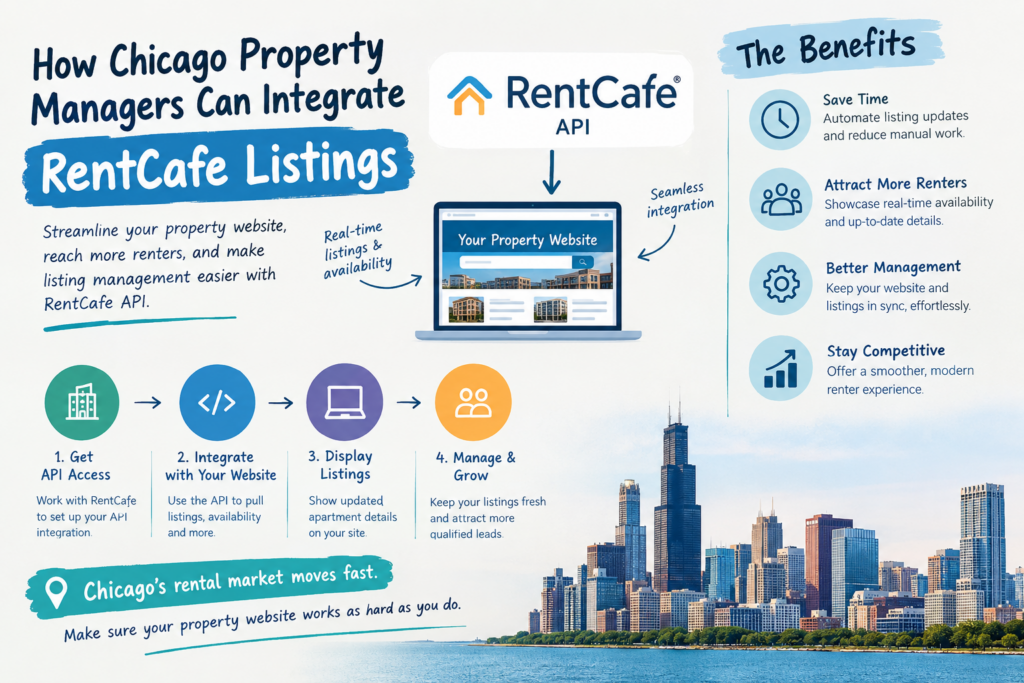
If you manage apartments in Chicago, you already know that getting people to your website is only part of the job. The bigger challenge is helping them quickly find the right apartment, check availability, view a floor plan and contact your leasing team.
That is where RentCafe listings Chicago integration can be useful.
Instead of manually updating apartment availability, pricing, floor plans and unit information across your website, you can connect your website with RentCafe data and create a much better experience for potential renters.
For a Chicago property manager handling one property or a larger multifamily portfolio, this can save time and make the website much more useful as a marketing and lead-generation tool.
In this guide, we’ll look at how RentCafe listings can be integrated into a Chicago property manager website, what information you can display, how apartment listings integration can support SEO and, most importantly, how to turn property listing traffic into actual leads.
Why Chicago Property Managers Need Better Apartment Listings Integration
Think about how people search for apartments today.
A renter might search Google for “apartments in River North Chicago,” “2 bedroom apartments in West Loop” or “pet-friendly apartments in Lakeview.”
When they reach your website, they don’t want to read a generic company description and then hunt around for available apartments.
They want answers quickly.
What apartments are available?
How much is the rent?
What does the floor plan look like?
How many square feet is the unit?
What amenities are available?
Where is the property located?
Can I schedule a tour?
Can I contact someone?
This is why apartment listings integration matters.
When your website can present current or regularly synchronized listing information in an easy-to-use format, renters have fewer reasons to leave the site and search somewhere else.
For property managers, it also means less time spent making repetitive manual updates.
How RentCafe Listings Integration Works
The basic concept is fairly straightforward.
RentCafe contains property and apartment information, while your website becomes the front-end experience where potential renters can browse that information.
Depending on your RentCafe account and available integration/API access, a developer can connect the relevant data with your website.
A typical workflow can look like this:
RentCafe → API/Integration → Website → Apartment Search → Property Details → Inquiry
The exact technical setup depends on the project.
Some websites may need apartment availability, while others may need floor plans, pricing, unit information, amenities and multiple property locations.
The first step should always be understanding what information is available and what you actually want to show on the website.
The goal isn’t simply to connect an API.
The goal is to create a better apartment-search experience.
RentCafe Listings Chicago: What Should Your Website Display?
A good Chicago property manager website should give renters the information they need without making them jump between multiple websites.
Depending on your available RentCafe data, your property pages can include information such as:
- Apartment availability
- Floor plans
- Bedroom and bathroom details
- Square footage
- Rent or pricing information
- Unit information
- Property photos
- Amenities
- Pet policies
- Neighborhood information
- Frequently asked questions
- Contact and inquiry options
The exact data available will depend on your RentCafe setup and integration access.
But from a user perspective, the principle is simple: show useful information where renters expect to find it.
A technically perfect integration is not very helpful if the visitor still has to click through several pages to find availability or a floor plan.
Make Apartment Search Easier for Chicago Renters
One of the biggest advantages of RentCafe listings Chicago integration is the ability to create a more useful apartment search experience.
Imagine someone looking for a two-bedroom apartment in Chicago.
Instead of scrolling through dozens of units, they can use filters to narrow the results based on things such as bedroom type, price, availability or other relevant criteria.
This makes the process much easier.
A good renter journey should look something like:
Search → Apartment Listing → Floor Plan → Property Information → Contact
Try to keep this journey simple.
If someone has to click five or six times before they can even find the floor plan, there is unnecessary friction.
And every extra step creates another opportunity for the visitor to leave.
Floor Plans Can Help Renters Make Faster Decisions
Floor plans are particularly important for multifamily properties.
Photos show what the property looks like, but a floor plan helps renters understand how the apartment is actually laid out.
A strong apartment page can display the floor plan together with bedroom count, bathrooms, square footage, pricing and availability.
This is much more useful than simply writing:
2 Bedroom Apartment – Contact Us for Details
If your integration supports the required floor plan information, displaying it directly on the property page can help renters make decisions faster.
It can also improve the quality of inquiries because people contacting your leasing team already have a better understanding of the apartment.
Use Chicago Neighborhood SEO Alongside Your Listings
This is an area where many property websites leave opportunities on the table.
You shouldn’t only optimize your website around the property name.
Chicago has a huge number of neighborhood-based apartment searches.
Depending on where your properties are located, your website can naturally target searches related to:
- Apartments in River North Chicago
- West Loop apartments
- Lincoln Park apartments
- Lakeview apartments Chicago
- South Loop apartments
- Streeterville apartments
- Gold Coast apartments Chicago
- Luxury apartments in Chicago
- Pet-friendly apartments in Chicago
- Chicago apartments near public transportation
But don’t create thin pages just to put a neighborhood keyword on the website.
Actually provide useful information.
Talk about the neighborhood, transportation, restaurants, parks, lifestyle, nearby attractions and what makes the area attractive to renters.
Then connect that information to your relevant properties and apartment listings.
This creates a much stronger combination of local SEO and property marketing.
If you’re building a larger real estate website, our guide on how to build a high-converting real estate WordPress website can also help with website structure, SEO and lead generation.
Your Property Website Should Be More Than a Listing Database
This is an important point.
I’ve seen property websites where the listing integration works technically, but the website still doesn’t generate many inquiries.
Why?
Because the website was treated like a database rather than a marketing tool.
Your property website should help visitors move toward a decision.
A property page can include a strong image gallery, apartment listings, floor plans, amenities, neighborhood information, FAQs and clear contact options.
Someone may not be ready to apply immediately.
That’s okay.
Give them an easy way to ask a question or request information.
Buttons such as:
Check Availability
Ask About This Apartment
Schedule a Tour
Request More Information
can make the next step obvious.
WordPress and RentCafe Integration for Chicago Properties
WordPress is a popular choice for property management websites because marketing teams can update content without depending on developers for every small change.
It can also provide a flexible platform for custom property templates and apartment search functionality.
A WordPress + RentCafe project may involve:
- RentCafe API or supported integration method
- WordPress
- Custom property templates
- Apartment listing pages
- Floor plan displays
- Search and filters
- Property information
- Caching
- Mobile optimization
- SEO-friendly URLs
- Lead forms
- Conversion tracking
The technical requirements can vary considerably from one project to another.
For example, you don’t always want your website making a fresh API request every time somebody opens a page.
Depending on the setup, caching or synchronized data can help improve performance and reduce unnecessary requests.
This becomes especially important when you have a large number of properties or units.
Don’t Ignore Mobile Users
Apartment searching happens on phones all the time.
Someone might search for an apartment while commuting, during lunch or while walking around a Chicago neighborhood.
Your website needs to make that experience easy.
Search filters should work properly on mobile.
Apartment photos should load quickly.
Floor plans should be readable.
Property information should not be buried.
And the contact or inquiry button should be easy to find.
Don’t build the desktop version and then treat mobile as an afterthought.
For a multifamily website, mobile usability should be part of the original design.
Can RentCafe Integration Help With SEO?
Yes, but there is an important distinction.
RentCafe integration itself does not automatically make a website rank on Google.
The integration provides useful property and apartment information, but SEO still depends on the overall website.
Your property pages should have useful content, clear headings, descriptive page titles, internal links, optimized images and a logical site structure.
You can also build supporting content around Chicago neighborhoods, apartment types and renter questions.
For example:
Apartments in West Loop Chicago
can become a useful location page that links to relevant properties.
A property page can then link back to the neighborhood guide.
This creates a natural internal linking structure and helps both users and search engines understand how the website is organized.
Turn Apartment Searches Into Leads
At the end of the day, property managers aren’t integrating listings just because they look nice.
The website needs to help generate business.
Your visitor should always have a clear next step.
If they find an apartment they like, make it easy to:
- Ask a question
- Request availability
- Schedule a tour
- Call the leasing office
- Submit an inquiry
- Start an application
You can also track which properties receive the most views and inquiries.
This gives your marketing team useful information.
If one property consistently gets traffic but very few inquiries, there may be an issue with the page, pricing presentation, calls to action or user experience.
That’s where website analytics and conversion optimization become valuable.
Managing Multiple Chicago Properties?
This is where a proper integration can really pay off.
Suppose your company manages properties in River North, West Loop, South Loop and Lakeview.
You don’t necessarily want four completely different website systems.
A well-planned website can use a consistent structure while giving each property its own content, images, amenities and apartment inventory.
Visitors can search by property, location or apartment type and then move into individual property pages.
This works particularly well for multifamily operators and property management companies managing multiple Chicago communities.
What to Ask Before Hiring a RentCafe Developer
Before hiring someone, don’t just ask:
“Can you integrate RentCafe?”
Ask more specific questions.
Can you work with the RentCafe API or integration method available to our account?
Can you display floor plans and apartment availability?
Can you build custom apartment search and filters?
Can the system support multiple properties?
How will the website handle API errors?
How will listing data be cached or synchronized?
Will the apartment pages be SEO-friendly?
Can you connect inquiries with analytics and conversion tracking?
These questions will help you separate someone who simply knows how to connect data from a developer who understands how a real estate website should work.
Technical integration is one part of the project.
The website experience, SEO and lead generation are equally important.
Build Around the Renter, Not Around the API
This is probably the biggest lesson when planning a RentCafe integration.
Don’t start with:
“How do we put RentCafe data on our website?”
Start with:
“What does a Chicago renter need to know before contacting us?”
Then build the website around that.
The integration should make it easier for renters to discover properties, compare apartments, view floor plans, understand amenities, explore neighborhoods and contact the leasing team.
That is when the integration becomes valuable.
If you want to improve the overall performance of your real estate website, you can also explore our guide on real estate WordPress website development and lead generation for ideas on site structure, SEO and conversion optimization.
Ready to Improve Your Chicago Property Website?
A properly planned RentCafe listings Chicago integration can do much more than display apartment inventory.
It can reduce manual updates, improve the renter experience, support local SEO and create a smoother path from Google search to property inquiry.
If your current website makes it difficult to manage apartment listings, display floor plans or turn visitors into inquiries, it may be worth reviewing the website and the integration together.
If you’re planning a new Chicago multifamily website, RentCafe integration or an existing website redesign, you can share your current website and requirements. A quick review can often identify where the biggest opportunities are.
Frequently Asked Questions
1. What is RentCafe listings integration?
RentCafe listings integration connects RentCafe property or apartment information with a website so visitors can view available apartments, property details, floor plans and other relevant information.
2. Can RentCafe listings be integrated with WordPress?
Yes. Depending on the RentCafe account, available API or integration access and project requirements, RentCafe data can be connected with a WordPress website using an appropriate integration method.
3. How can Chicago property managers use RentCafe listings?
Chicago property managers can use integrated RentCafe listings to display apartments, floor plans, availability and property information while giving renters search, filtering and inquiry options.
4. Does RentCafe integration automatically improve SEO?
No. RentCafe integration provides useful listing data, but SEO also requires quality content, proper page structure, internal linking, technical optimization, local SEO and a good user experience.
5. Can RentCafe integration display apartment floor plans?
The available floor plan information depends on the RentCafe account and integration capabilities. A developer can review the available data and determine how it can be displayed on the website.
6. Can one RentCafe integration support multiple Chicago properties?
Yes, a properly planned integration can support multiple properties, although the exact implementation depends on the available data and website requirements.
7. Can RentCafe listings help with Chicago neighborhood SEO?
Yes. Property listings can be supported with useful neighborhood content targeting areas such as River North, West Loop, Lincoln Park, Lakeview, South Loop and other Chicago locations.
8. How can apartment listings integration generate more leads?
It can reduce the number of steps between apartment discovery and inquiry. When renters can quickly find a suitable unit, view its details and contact the leasing team, the website has a better chance of generating qualified leads.
9. Should RentCafe data be loaded every time a visitor opens a page?
Not necessarily. Depending on the integration, caching or synchronized listing data can improve website performance and reduce unnecessary API requests.