
RentCafe API for Chicago Multifamily Property Websites
A Chicago multifamily property website has a lot more work to do than simply showing beautiful building photos.
Renters want to see available apartments, floor plans, pricing, amenities, photos and location details. And they want that information quickly, especially when they’re comparing several properties at the same time.
This is where RentCafe API Chicago multifamily integration can make a real difference.
Instead of manually updating apartment listings every time a unit becomes available, a website can connect with RentCafe and bring supported property information into the website automatically. For multifamily owners and property managers handling several communities, that can save a significant amount of time.
But there is an important distinction here.
Connecting an API is only the technical part. A successful multifamily website needs to take that data and turn it into a useful renter experience, a strong SEO asset and, ultimately, a lead-generation channel.
Let’s look at how that can be done.
What Is RentCafe API and Why Does It Matter for Multifamily Websites?
An API allows two different systems to communicate with each other and exchange information.
For a multifamily property website, RentCafe API access can potentially provide information such as property details, apartment units, floor plans, pricing, availability and other supported data. The exact information available depends on the API access, documentation and endpoints provided for the specific account.
A typical setup might look like this:
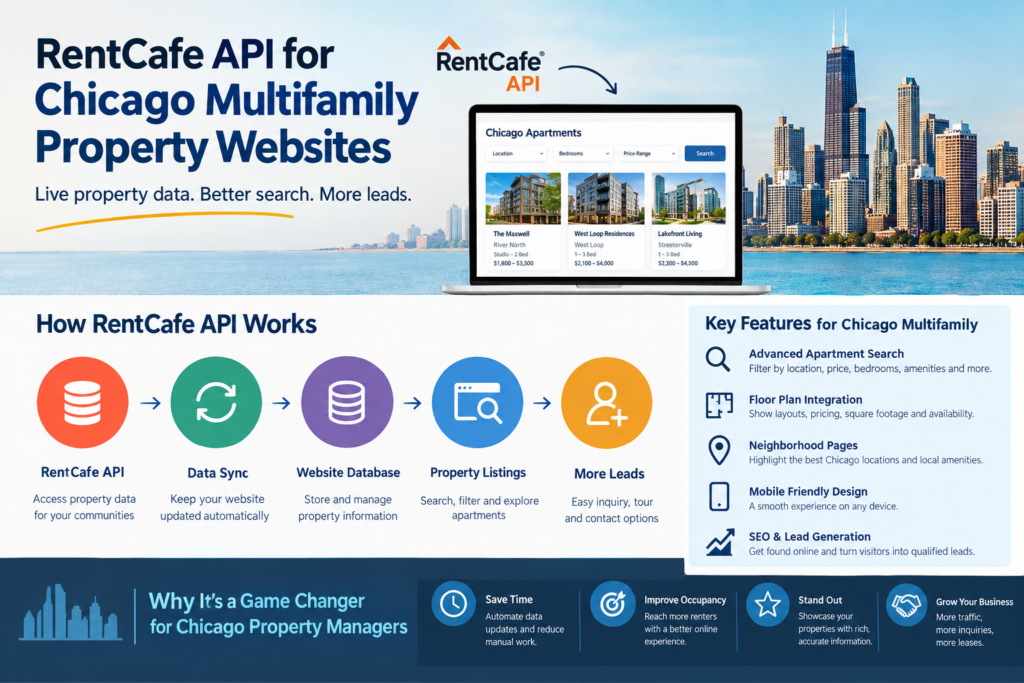
RentCafe → API → Website Database → Apartment Search → Property Pages → Leads
The website doesn’t need to expose the technical side to visitors. They simply see an apartment search experience where the information is organized in a way that makes sense.
For example, someone searching for a two-bedroom apartment in Chicago doesn’t care that an API successfully returned a JSON response.
They want to know:
Is it available?
How much does it cost?
How big is the apartment?
Where is the property?
What amenities are included?
Can I schedule a tour?
That’s what the website should focus on.
Why Chicago Multifamily Websites Need Better Property Search
Chicago is a competitive apartment market, and renters have plenty of choices.
Someone might be searching specifically for a luxury apartment in River North. Another person might care more about being close to the CTA. Someone else may want a pet-friendly two-bedroom apartment with parking.
A simple page showing a list of properties doesn’t really solve those problems.
A better multifamily website lets visitors narrow their choices using practical filters such as:
- Chicago neighborhood or location
- Apartment type
- Number of bedrooms
- Number of bathrooms
- Monthly rent
- Square footage
- Availability
- Pet-friendly options
- Parking
- Community amenities
- Apartment features
This is one of the reasons multifamily website design Chicago projects should start with the renter journey instead of starting with colors, fonts and animations.
Design is important, of course. But if visitors can’t find the right apartment in a few clicks, a beautiful website won’t generate many leads.
How a RentCafe Property Listing Integration Works
A proper property listing integration is more than copying data from RentCafe and displaying it on a webpage.
Let’s say a property management company has 10 or 20 apartment communities around Chicago. Each community could have several floor plans and many individual units.
Keeping all that information manually updated would quickly become difficult.
With an API integration, the website can periodically synchronize supported information from RentCafe.
The process can be structured like this:
1. Connect to RentCafe API
The developer configures the required API authentication and establishes communication with the available RentCafe endpoints.
2. Map the Property Data
Information such as property names, addresses, floor plans, units, pricing, images and amenities is mapped into the website’s data structure.
3. Synchronize the Data
A scheduled process checks for changes and updates the website’s stored information.
4. Display Properties
The synchronized information is presented through apartment search pages, property pages and floor-plan sections.
5. Generate Leads
Visitors can request information, check availability, contact leasing or schedule a tour.
This is much more manageable than asking a marketing team member to manually update every apartment listing.
Build Property Pages That Actually Help Renters
One mistake I see with API-driven websites is treating the property page like a database record.
It shouldn’t feel that way.
A property page needs to sell the experience of living there while still providing accurate information.
A strong Chicago multifamily property page could include:
Property Overview
Explain what the property is and where it is located.
Photo Gallery
Show the exterior, apartments, amenities and common areas.
Floor Plans
Let visitors explore available layouts.
Pricing and Availability
Display supported current information from the property system.
Amenities
Highlight features that matter to renters.
Neighborhood
Explain what makes the surrounding Chicago location useful or attractive.
Lifestyle
Talk about restaurants, transportation, entertainment, parks and nearby attractions where relevant.
FAQ
Answer common questions before someone has to contact the leasing team.
Lead Form
Give visitors a simple way to ask a question or request availability.
The API supplies the data.
The website turns that data into a sales and marketing experience.
Make Floor Plans a Core Feature
For apartment websites, floor plans are often one of the most important parts of the decision-making process.
A renter may like the building. They may even like the photos. But eventually they’re going to ask:
What does the apartment look like?
How much is it?
How many square feet?
Is it available?
That’s why floor plans shouldn’t be buried somewhere inside a generic property description.
A useful floor-plan section can display:
- Floor-plan name
- Bedroom and bathroom count
- Square footage
- Starting rent
- Available units
- Availability date
- Floor-plan image
- Virtual tour, if available
- Inquiry or tour CTA
If the necessary information is available through RentCafe API, the website can use synchronization to keep relevant information updated.
That gives renters a much better experience and reduces manual website maintenance.
RentCafe API and Chicago Local SEO
There is another major opportunity here: SEO.
A multifamily website can potentially rank for searches such as:
- Chicago apartments
- Chicago apartment rentals
- 1 bedroom apartments Chicago
- 2 bedroom apartments Chicago
- luxury apartments Chicago
- pet-friendly apartments Chicago
- apartments with parking Chicago
- apartments in River North
- apartments in West Loop
- apartments in Lincoln Park
- multifamily apartments Chicago
But there is a right and wrong way to approach this.
I wouldn’t recommend generating thousands of pages automatically from every combination of filters.
For example, creating separate pages for:
/chicago-apartments-2-bedroom-pet-friendly-parking/
/chicago-apartments-2-bedroom-pet-friendly-no-parking/
/chicago-apartments-2-bedroom-no-pets-parking/
and hundreds of similar combinations can quickly create a low-quality website structure.
Instead, focus on useful pages that match genuine search intent.
Create Chicago Neighborhood Pages With Real Value
Chicago gives multifamily businesses a strong opportunity to build location-focused content.
Depending on the actual property portfolio, useful pages could focus on neighborhoods such as:
River North
West Loop
Lincoln Park
Lakeview
South Loop
Streeterville
Gold Coast
Logan Square
Wicker Park
Hyde Park
But don’t create neighborhood pages just because the keyword exists.
A useful neighborhood page should actually help someone make a rental decision.
You could include relevant apartment communities, available floor plans, transportation information, local amenities, nearby attractions and answers to common renter questions.
Then connect those pages naturally to the relevant property listings.
For example, someone reading about apartments in West Loop should be able to move directly to available West Loop properties.
If you’re developing a broader real estate website strategy, you can also link this article naturally to our complete real estate WordPress website guide.
Don’t Let the API Make Your Website Slow
This is one technical area that deserves attention before development starts.
A website could theoretically make API requests whenever a visitor loads a property page. But for a larger multifamily website, that’s not always the best approach.
A better architecture can often look like:
RentCafe API → Scheduled Synchronization → Website Database → Fast Front End
The website stores the relevant information locally and updates it according to a defined schedule.
This can reduce unnecessary API requests and provide a faster experience for visitors.
Other performance improvements can include:
- Image optimization
- WebP or modern image formats
- Browser caching
- CDN delivery
- Lazy loading
- Database optimization
- Efficient search queries
- Server-side caching
This becomes even more important when your website has hundreds of properties or units.
Mobile Experience Should Be a Priority
Apartment searches don’t only happen from desktop computers.
People search for apartments from their phones while commuting, during lunch breaks or while visiting different Chicago neighborhoods.
That means the mobile experience needs to be designed carefully.
Search filters should be easy to open.
Property cards should show the important information without requiring visitors to open several pages.
Images should load quickly.
And the contact or availability CTA should be easy to find.
A simple button such as Check Availability, Request a Tour or Ask About Pricing can make the next step much clearer.
You don’t need to push visitors aggressively. Just make it easy for someone who is interested to contact the leasing team.
Turn Apartment Search Traffic Into Qualified Leads
SEO traffic is useful, but traffic alone isn’t the goal.
For a multifamily property company, the real value comes when a website visitor becomes a leasing inquiry.
That’s why conversion elements should be built into the property experience.
For example:
Interested in this apartment? Check current availability or request more information from our leasing team.
A short form can collect:
- Name
- Phone
- Apartment preference
- Desired move-in date
You can also provide different conversion options depending on the visitor’s intent:
Check Availability
Request a Tour
Ask About Pricing
Get Floor Plan Information
Contact Leasing
This is more natural than placing the same “Contact Us” button everywhere.
WordPress and RentCafe API: Can They Work Together?
Yes, WordPress can be a practical platform for a multifamily website, particularly when the marketing team needs to manage pages, blog content, FAQs, neighborhood guides and other marketing material.
The important part is how the RentCafe integration is developed.
For a larger project, you may need:
- Custom post types
- Custom database tables
- API authentication
- Scheduled data synchronization
- Search and filtering
- Property templates
- Floor-plan templates
- Availability handling
- API error handling
- SEO-friendly URLs
- Caching
So this isn’t simply a matter of installing a WordPress theme and adding an API plugin.
The theme controls the visual presentation.
Custom development handles the business logic.
And the content and SEO strategy bring qualified visitors to the website.
If you’re planning a complete real estate website, you can also explore our guide on building a high-converting real estate website.
What to Look for in a RentCafe Developer
If RentCafe integration is an important part of your website, don’t hire a developer based only on their WordPress experience.
Ask how they plan to handle the API.
Where will the property data be stored?
How often will information synchronize?
What happens when an apartment becomes unavailable?
How will API errors be handled?
Can the search system work with the imported property data?
How will the website perform when the number of properties increases?
And perhaps the most useful question:
Have you worked on a real estate or multifamily API integration before?
A developer who understands both technology and the real estate business will generally be able to make better decisions about property structure, search, SEO and lead generation.
Build the Website Around the Renter, Not the API
It’s easy to get caught up in the technical side of an integration.
API credentials. Endpoints. Data fields. Synchronization. Databases.
All of that matters.
But your renter doesn’t care about any of it.
They want to find the right apartment, understand the property, see the floor plan, check availability and contact someone without making the process complicated.
That’s what the website should be designed around.
A well-planned RentCafe API Chicago multifamily website can combine live or synchronized property information with strong local SEO, useful neighborhood content, fast apartment search and conversion-focused property pages.
That combination is much more valuable than simply displaying a feed of apartment listings.
If your Chicago multifamily business already uses RentCafe and you’re considering a new website, redesign or custom property listing integration, it makes sense to plan the data structure and website architecture before development begins.
A little planning upfront can save a lot of development time later.
Need help building a RentCafe-powered multifamily website? We can help plan the WordPress architecture, property listing integration, apartment search, floor-plan experience, Chicago SEO and lead-generation features around your specific requirements.
FAQ: RentCafe API for Chicago Multifamily Property Websites
1. What is RentCafe API used for on a multifamily website?
RentCafe API can allow a website to exchange property-related information with RentCafe, depending on the API access available. This may include property details, floor plans, units, pricing, availability and other supported information.
2. Can I integrate RentCafe with a WordPress multifamily website?
Yes. WordPress can be connected to RentCafe through custom API development. The exact implementation depends on the available API documentation, endpoints, authentication and data requirements.
3. Can RentCafe API automatically update apartment availability?
Potentially, yes. If availability information is included in the API access, a scheduled synchronization process can update the website when apartment availability or other property information changes.
4. Can a Chicago multifamily website display RentCafe floor plans?
Yes. Where the relevant floor-plan information is available through the API, it can be displayed on property pages or dedicated floor-plan sections along with information such as apartment type, square footage, pricing and availability.
5. Can RentCafe API integration help with SEO?
It can support an SEO strategy by providing structured property information that can be displayed on useful, search-friendly pages. However, simply importing API data isn’t enough. The website should also provide unique content, neighborhood information, FAQs and other useful resources.
6. Can I create Chicago neighborhood pages for SEO?
Yes. Multifamily websites can create useful location-focused pages for Chicago neighborhoods such as River North, West Loop, Lincoln Park, Lakeview and South Loop when those locations are relevant to the property’s portfolio.
7. Should RentCafe API data be loaded every time someone visits the website?
Not necessarily. For larger websites, synchronizing relevant information into a local database can improve performance and reduce unnecessary API requests.
8. Can a RentCafe-powered website generate leasing leads?
Yes. Property inquiry forms, tour requests, availability requests, phone CTAs and other conversion elements can be added throughout the website to turn apartment search traffic into leasing opportunities.
9. How much does a RentCafe API multifamily website cost?
There is no single fixed price. The cost depends on factors such as the number of properties, API requirements, search functionality, website design, data synchronization, CRM integrations, SEO requirements and other custom features.
10. Do I need a developer experienced with RentCafe API?
If RentCafe integration is central to the project, working with a developer who understands API integrations as well as real estate and multifamily websites can help reduce technical problems and make the website easier to maintain.