
How to Build a Chicago Apartment Website Using RentCafe API
Building an apartment website for Chicago is not really about putting a few property photos on a WordPress page and adding a “Contact Us” button. If the goal is to generate rental leads, the website needs to help people find the right apartment quickly—and give them a reason to contact you.
That is where a Chicago apartment website RentCafe API integration can become useful.
Instead of manually adding hundreds of apartments, floor plans, pricing details, amenities and availability, you can connect your website to property data through the RentCafe API and display relevant information automatically. The result can be a much more useful apartment listing website Chicago renters can actually search and use.
I’ve worked on real estate websites where the biggest problem wasn’t the design. It was keeping property information accurate while making the site easy for users and search engines to understand. API integration helps solve part of that problem, but the way you structure the website matters just as much.
Let’s look at how I would approach it.
What a Chicago Apartment Website Should Actually Do
Before touching the API, decide what the website needs to accomplish.
A good Chicago rental website should allow someone to browse properties, narrow results by location and budget, view apartment details, compare options and submit an inquiry without jumping through five different pages.
For example, a renter might be looking for:
- Apartments in River North
- 1-bedroom apartments in Chicago
- Pet-friendly apartments
- Apartments under $2,500
- Apartments near public transportation
- Luxury apartments in downtown Chicago
- Apartments with parking
- Available apartments near a specific neighborhood
The website should make those searches easy.
Your API integration then becomes the engine behind the property data while the website handles the user experience, SEO and lead generation.
Understanding the RentCafe API Integration
RentCafe provides property management and apartment marketing technology, and API access can be used to connect property information with another website or application, depending on the access and API arrangement available for the project.
This is an important point: don’t start development until you know exactly which RentCafe API endpoints and data fields you have access to.
Depending on the integration, your data may include information such as:
- Property name
- Property address
- Apartment units
- Floor plans
- Bedroom and bathroom count
- Rent
- Square footage
- Availability
- Amenities
- Property images
- Community information
- Unit details
A developer can then map this information into your website’s database.
For a WordPress project, I normally wouldn’t recommend making the website request the external API every time someone opens a property page. That can make the website slower and creates unnecessary dependency on the external service.
A better approach is often:
RentCafe API → Scheduled Sync → WordPress Database → Website
The website displays locally stored information, while a scheduled process periodically checks for changes.
That architecture is much easier to manage.
Building the Website Architecture
For a Chicago apartment website, I would separate the data into logical components instead of treating every property as a normal blog post.
A simple structure could look like this:
Properties
Each property represents an apartment community.
Floor Plans
Each property can have multiple floor plans such as studio, 1-bedroom, 2-bedroom and 3-bedroom apartments.
Units
Individual available units can contain rent, availability date, square footage, floor and other information.
Amenities
Amenities can be attached to the property or individual units.
Locations
Chicago neighborhoods can be handled separately so the website can create useful location pages.
This structure becomes particularly powerful for SEO.
Instead of having only /apartments/, you could eventually have pages targeting searches such as:
/chicago-apartments/
/chicago-1-bedroom-apartments/
/apartments-river-north-chicago/
/apartments-lincoln-park-chicago/
/luxury-apartments-chicago/
Obviously, you don’t want to generate thousands of thin pages just because the API gives you thousands of possible combinations. Every indexable page should have a genuine purpose and useful content.
How the Chicago Apartment Search Should Work
This is where many real estate websites either become useful—or frustrating.
The search interface should be simple.
A visitor could start with:
Location → Bedrooms → Price → Amenities → Availability
Then the website returns matching properties.
For example:
Chicago → 2 Bedrooms → $2,000–$3,000 → Pet Friendly
The results page can display apartment cards containing the property image, name, neighborhood, rent range, bedrooms, bathrooms and a clear button such as View Apartments or Check Availability.
Don’t overload the first screen with 30 filters.
People generally want to narrow down their options quickly. You can put advanced filters behind an “More Filters” option.
For larger Chicago markets, map-based search can also be useful, particularly when location is an important part of the buying—or in this case renting—decision.
Creating Property Pages That Generate Leads
The property detail page is where your API integration and marketing strategy need to work together.
A basic property page shouldn’t just dump API fields onto the screen.
Instead, structure it like a real apartment marketing page.
Start with:
Property Name
Chicago neighborhood/location
Starting rent
Available floor plans
Photos
Amenities
Apartment features
Nearby attractions and transportation
Availability
Then give the visitor a clear next step.
For example:
Interested in this Chicago apartment?
Request current pricing and availability from our team.
The lead form can ask for basic information such as name, email, phone and preferred apartment type.
If you’re building the website for an apartment locator, property manager or real estate company, these leads can become much more valuable than simply sending visitors to an external listing platform.
Using RentCafe API Data Without Creating an SEO Mess
This is one of the areas I would pay close attention to.
API-driven websites can create thousands of URLs very quickly.
Imagine you have 500 properties, 20 floor plans per property and multiple availability combinations. If every variation becomes an indexable URL, you can end up with a huge collection of near-duplicate pages.
Google doesn’t need 50 pages that say essentially the same thing.
Instead, create strong landing pages around genuine search demand.
For example:
Chicago Apartment Listing Website
Your main apartment search page can target broader Chicago apartment searches.
Then create useful neighborhood pages around locations that actually matter to renters.
A neighborhood page might include:
- Local apartment listings
- Typical apartment types
- Price ranges
- Transportation information
- Local amenities
- Nearby neighborhoods
- Frequently asked questions
This gives the page context beyond the API data.
If you’re also working on the broader SEO strategy, a guide such as real estate website SEO strategies can help connect informational content with your apartment listings.
Making the Website Fast
API integration doesn’t automatically mean a slow website.
The problem usually comes from poor implementation.
I would recommend storing synchronized property information locally and using scheduled updates rather than making repeated API calls for every visitor.
You can also use:
- Image compression
- WebP images
- Browser caching
- CDN delivery
- Lazy loading
- Database indexing
- Lightweight search queries
- Server-side caching
The goal is simple: the visitor shouldn’t have to wait for several external API requests before seeing apartments.
A fast website also creates a better experience on mobile, which matters enormously for rental searches.
Mobile Experience Is Not Optional
A lot of apartment searches happen while people are away from their computers.
Someone might be sitting on the train, browsing apartments on their phone, and saving a few properties to investigate later.
Your Chicago apartment website needs to work properly on a small screen.
Search filters should be easy to open.
Apartment cards should be readable.
Images shouldn’t push the important information halfway down the page.
And the inquiry button should be easy to find.
I usually recommend keeping a strong mobile CTA visible on property pages—something like Check Availability or Request Information.
Small details like that can make a surprisingly big difference in lead conversion.
Why You May Want a RentCafe Developer in Chicago
If your project depends heavily on RentCafe data, hiring a generic WordPress developer isn’t always enough.
A RentCafe developer Chicago project requires someone who understands both sides of the equation: API integration and real estate websites.
The developer needs to think about things like API authentication, data mapping, synchronization, error handling, database structure, property URLs, availability changes and website performance.
For example, what happens if an apartment that was available yesterday is rented today?
The website shouldn’t continue showing it as available indefinitely.
Your synchronization system needs to update the record, remove outdated availability or mark it appropriately.
That is the kind of practical issue that isn’t obvious when you’re simply designing the homepage.
Adding Chicago Neighborhood SEO
Chicago gives you a lot of opportunities for location-based SEO.
Depending on your actual inventory, you might build useful pages around areas such as:
- River North
- Lincoln Park
- West Loop
- South Loop
- Lakeview
- Streeterville
- Gold Coast
- Wicker Park
- Logan Square
- Hyde Park
Don’t create these pages just for keywords.
If you have apartments in River North, build a genuinely useful River North apartment page. Show relevant listings, explain the area, discuss transportation and link to related properties.
This creates a much stronger apartment listing website Chicago than a collection of automatically generated pages.
Internal Linking That Makes Sense
Internal links should help users move around the site, not just exist because an SEO checklist says you need them.
For example, from a Chicago apartment guide, you could naturally link to:
Chicago apartment search
Best Chicago neighborhoods for renters
Chicago real estate website development
And from a neighborhood page, link back to relevant apartment listings.
You can also create supporting content around questions renters actually ask, such as how much a 1-bedroom apartment costs in Chicago, which neighborhoods are best for commuting, or what amenities are common in luxury apartment buildings.
That combination of useful content + live listings gives the website more depth.
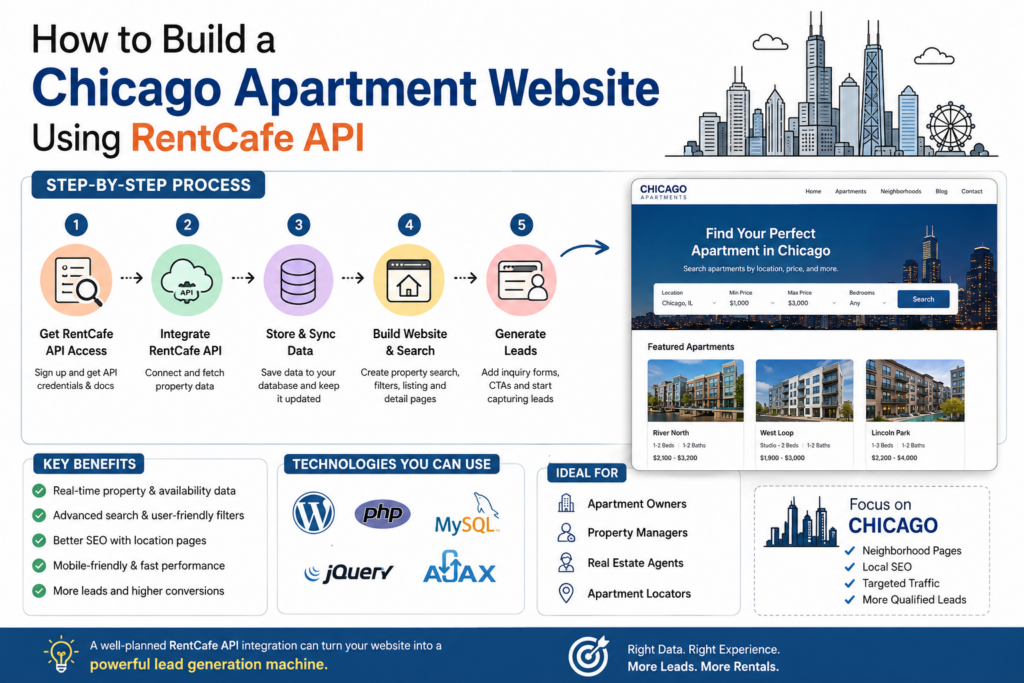
A Practical RentCafe API Development Workflow
A project like this can be broken down into a fairly straightforward process.
1. Get API documentation and credentials
Understand available endpoints, authentication and usage limits before development starts.
2. Define the website data structure
Decide how properties, units, floor plans, amenities and locations will be stored.
3. Build the API integration
Create the connection between RentCafe and your website.
4. Build the synchronization system
Set up scheduled imports and updates.
5. Create the apartment search
Add filters, sorting and pagination.
6. Build property and floor-plan pages
Make the API information useful and readable instead of displaying raw data.
7. Add SEO architecture
Create optimized category, neighborhood and property URLs.
8. Add lead generation
Use inquiry forms, calls to action and conversion tracking.
9. Test everything
Check API failures, unavailable units, duplicate records, mobile layouts, speed and forms.
10. Launch and monitor
After launch, monitor search performance, leads and data synchronization rather than considering the project “finished.”
Turning Apartment Traffic Into Real Leads
Getting visitors is only half the job.
If someone lands on a property page and can’t figure out what to do next, you’ve wasted the opportunity.
Give them several natural ways to contact you:
Check Availability
Request Pricing
Schedule a Tour
Ask a Question
Get Apartment Recommendations
You can also capture broader leads from visitors who aren’t ready to contact you about a specific property.
For example:
Not sure which Chicago neighborhood is right for you? Tell us what you’re looking for and we’ll help narrow down the options.
That’s a much softer CTA than “Contact Us Now,” and it gives the visitor a reason to submit the form.
Final Thoughts
A successful Chicago apartment website RentCafe API project isn’t simply an API integration.
The API provides the property data, but your website has to turn that data into something useful.
The strongest setup combines accurate apartment information, fast search, neighborhood-focused SEO, mobile-friendly property pages and a simple lead-generation process.
If you’re building an apartment listing website for Chicago and already have RentCafe access, the next step is to map out the API data and website architecture before starting the actual development. That can save a lot of rework later.
And if you’re planning to build a real estate website around WordPress, you may also want to explore a complete real estate WordPress website guide before choosing the final architecture.
Need a Chicago apartment website connected to RentCafe? A properly planned integration can give you a website that isn’t just displaying apartments—it can become a real lead-generation channel for your business.
FAQ: Chicago Apartment Website Using RentCafe API
1. Can I build a Chicago apartment website with RentCafe API?
Yes, provided you have the appropriate RentCafe API access and documentation. The API can be integrated with WordPress or a custom application to synchronize property and apartment information.
2. Can RentCafe API show apartment availability?
The available data depends on the specific API access and endpoints provided for your account. If availability information is exposed, it can be synchronized with your website and displayed to visitors.
3. Can I build the website with WordPress?
Yes. WordPress can work well for this type of project when the API integration is developed properly. Property data can be stored in a custom database structure or custom post type architecture, depending on the requirements.
4. How often should apartment data be synchronized?
It depends on how frequently availability and pricing change. For active rental inventories, scheduled synchronization several times per day may be more appropriate than a weekly update.
5. Can I create Chicago neighborhood pages?
Yes, and this can be particularly useful for SEO. Pages targeting neighborhoods such as River North, Lincoln Park, West Loop and South Loop can combine relevant apartment listings with genuinely useful local information.
6. Can the website include apartment search filters?
Yes. Filters can be created for factors such as location, bedrooms, bathrooms, price, square footage, amenities and availability, depending on the data available through the API.
7. Can RentCafe data be used for SEO?
API data can be displayed on SEO-friendly pages, but simply importing the same data into hundreds of pages isn’t enough. The website should add unique, useful content and avoid creating large numbers of duplicate or thin pages.
8. How much does a RentCafe apartment website cost?
The cost varies considerably depending on API requirements, number of properties, search functionality, design, CRM integration, automation and whether the project uses WordPress or a custom application.
9. Should I hire a RentCafe developer for the project?
If RentCafe integration is central to the website, working with a developer who understands API integrations and real estate websites can reduce technical problems and make the project easier to maintain.
10. Can the website generate apartment leads?
Yes. Property inquiry forms, tour requests, availability requests, phone CTAs and recommendation forms can all be integrated into the website to turn apartment search traffic into leads.