

How to Display Floor Plans on a Chicago Apartment Website Using RentCafe API
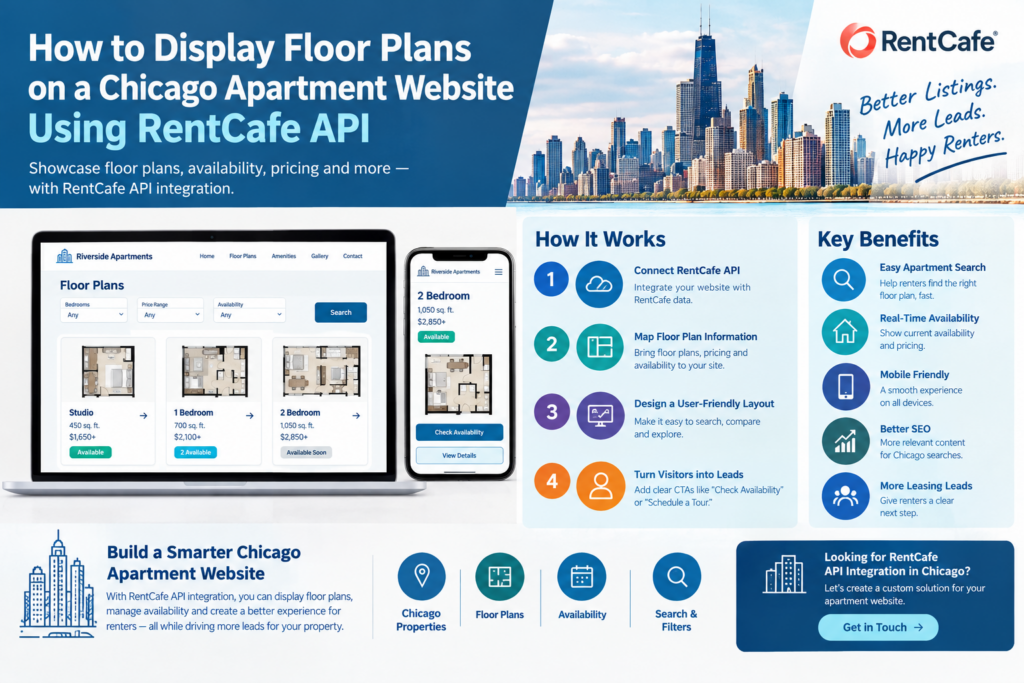
When someone visits a Chicago apartment website, they usually don’t want to spend five minutes reading about the property before seeing the floor plans.
They want to know what the apartment actually looks like.
Is there a one-bedroom that fits their budget? How much space does the two-bedroom have? Is a particular floor plan available? What is the price? Can they schedule a tour?
That’s why RentCafe floor plans Chicago integration can be a useful feature for multifamily and apartment websites.
With the appropriate RentCafe API access, property and floor-plan information can potentially be connected to a website and presented in a much more user-friendly way. Instead of manually rebuilding floor-plan information every time something changes, the website can use available data from the integration.
But there is an important distinction here: displaying API data is only half of the job.
The other half is designing the page so renters can actually understand the floor plans and take the next step.
Why Floor Plans Matter on a Chicago Apartment Website
Floor plans are often one of the most visited sections of an apartment website.
A renter may already know the neighborhood and have seen the building photos. Now they’re trying to answer a much more practical question:
“Can I actually live here?”
The floor plan helps them understand the layout, bedroom configuration, square footage and other details before they contact the leasing team.
For Chicago properties, this becomes even more useful because renters may be comparing several apartment communities across neighborhoods such as River North, West Loop, Lakeview, Lincoln Park, South Loop or Downtown Chicago.
If your website makes it easy to compare floor plans, you’re removing one more reason for the renter to leave.
What Is RentCafe Floor Plan Integration?
RentCafe floor plan integration generally means connecting available RentCafe property data to your website and using that information to create a customized floor-plan browsing experience.
Depending on the RentCafe account, API access and available data, the integration may provide information such as:
- Floor-plan names
- Bedroom and bathroom counts
- Square footage
- Pricing
- Availability
- Apartment or unit information
- Floor-plan images or related media
- Property information
The exact fields available should always be confirmed before development.
A developer then maps the available information into the website.
For example:
RentCafe data → API integration → Website floor-plan page → Renter inquiry
The website can control how the information looks and how the renter moves through the page.
How to Display RentCafe Floor Plans in Chicago
There isn’t one single layout that works for every apartment community.
For most Chicago multifamily websites, I prefer keeping the initial floor-plan view simple.
A renter should be able to see the basic information without opening several pages.
For example, a floor-plan card could show:
A2
1 Bedroom | 1 Bathroom 720 sq. ft. Starting from $X,XXX Availability: Available
Then provide buttons such as:
View Floor Plan
Check Availability
Schedule a Tour
This gives the renter enough information to decide whether they want to explore further.
The detailed floor-plan page can then provide the larger layout, apartment details, amenities, photos and contact options.
Apartment Floor Plan Integration Should Support Search
A common mistake is displaying floor plans as a simple gallery.
It looks fine, but it doesn’t help much when a property has dozens of options.
A better apartment floor plan integration can include filters.
For example:
Studio | 1 Bed | 2 Bed | 3 Bed
Then allow additional filtering where the available data supports it:
Price range
Square footage
Availability
Move-in date
Property
This becomes particularly useful for property managers handling multiple Chicago communities.
Instead of asking renters to browse every floor plan, the website helps narrow down the options.
That’s a much better user experience.
Show Availability Alongside the Floor Plan
Imagine finding the perfect floor plan and then having to call the leasing office just to find out whether it’s available.
That’s unnecessary friction.
Where the integration supports it, availability should be displayed as part of the floor-plan experience.
A renter might see:
B2 — 2 Bedroom / 2 Bath
1,050 sq. ft. Available units: 2 Price: $2,650+
Check Availability →
Now the floor plan isn’t just informational content. It becomes part of the leasing journey.
The exact availability and pricing behavior will depend on the data and integration setup, so the website should make it clear when information is subject to change.
Don’t Hide Floor Plans Behind Too Many Clicks
This sounds obvious, but it happens a lot.
The homepage has a button called “Explore Our Community.”
Then another page.
Then “Apartments.”
Then “Floor Plans.”
Then finally the renter reaches the information they were looking for.
That’s too much work.
A Chicago apartment website should make the floor-plan section easy to find.
Good navigation might include:
Apartments | Floor Plans | Amenities | Gallery | Neighborhood | Contact
You can also link to relevant floor plans directly from apartment search results and property pages.
The goal isn’t to make every page complicated.
It’s to make the important information easy to reach.
Property Website Floor Plans Need Good Visual Presentation
The API can provide the data, but the website controls the presentation.
This is where custom property website floor plans can make a noticeable difference.
A floor plan should be large enough to understand.
Don’t squeeze it into a tiny card just because the desktop layout has limited space.
Give renters the ability to zoom where appropriate. Make the text readable. If there are multiple versions of a floor plan, make the relationship between them clear.
And don’t forget mobile.
Someone viewing a floor plan on an iPhone should not have to pinch and zoom five times just to understand the bedroom layout.
Add Apartment Photos Around the Floor Plan
A floor plan tells the renter about the layout.
Photos tell them what the space feels like.
Using both together can make the page much more useful.
For example:
B2 Floor Plan
→ Floor plan image → Living room photo → Kitchen photo → Bedroom photo → Bathroom photo → Amenities → Availability → Schedule a Tour
Not every floor plan will have matching apartment photos, of course.
But where good photography is available, connecting the visual experience can help renters understand the property better.
Chicago Neighborhood SEO + Floor Plans
Floor plans can also fit into a broader local SEO strategy.
Let’s say you manage a multifamily property in West Loop.
Instead of only having a generic “Floor Plans” page, your website could have useful supporting content around:
West Loop apartments
1 bedroom apartments in West Loop Chicago
2 bedroom apartments in West Loop
West Loop apartment floor plans
Chicago multifamily apartments
The important part is not simply inserting these phrases into every page.
The page needs to genuinely help someone looking for an apartment in that location.
For example, a neighborhood-focused property page can explain the location, transportation, nearby attractions, lifestyle, property amenities and available apartment options.
Then the floor-plan section gives visitors the practical information they’re looking for.
This combination can make the website more useful for both search engines and renters.
Build Floor Plan Pages That Can Generate Leads
A floor plan page shouldn’t end with the floor plan image.
This is where many apartment websites lose opportunities.
Someone has just spent time looking at a specific apartment layout. They’re showing interest.
Give them a clear next step.
Depending on the property’s leasing process, that might be:
Check Availability
Schedule a Tour
Ask About This Floor Plan
Contact Leasing
Apply Now
A simple inquiry form could ask for:
Name Email Phone Preferred floor plan Message
Don’t ask for 15 fields when you only need five.
The less friction there is, the easier it is for an interested renter to reach the leasing team.
RentCafe API + WordPress for Chicago Apartments
WordPress is a practical platform for many apartment and multifamily websites because marketing teams can manage pages, blog content, neighborhood guides and SEO without needing a developer for every small change.
RentCafe data can potentially be integrated into that WordPress environment, depending on the available API access and technical requirements.
A custom WordPress implementation could include:
Apartment search
RentCafe floor-plan integration
Availability
Property pages
Floor-plan filters
Neighborhood pages
Lead forms
SEO landing pages
Mobile-friendly design
The important part is keeping the technical integration behind the scenes.
The renter shouldn’t feel like they’re interacting with an API.
They should feel like they’re using a well-designed Chicago apartment search website.
Performance Matters With Floor Plan Integration
Floor plans are visual assets, and apartment websites can become image-heavy very quickly.
Large floor-plan files combined with property photos, galleries, videos and API requests can make a page slow.
A developer should consider image compression, appropriate image dimensions, lazy loading, caching and efficient API requests.
You don’t necessarily need to load every floor plan image immediately.
Show the options first, then load additional content when the renter requests it.
This can make the experience noticeably smoother, especially on mobile connections.
Make Floor Plans Easy for Google and AI Search to Understand
There is another opportunity here: don’t rely on the floor-plan image alone.
Search engines can’t treat an image as a complete replacement for useful text.
Where appropriate, include readable information alongside the image:
Floor Plan: A2 Type: 1 Bedroom, 1 Bathroom Size: 720 sq. ft. Availability: Check current availability Location: Chicago, IL
This gives search engines more context.
It also helps visitors who prefer scanning text instead of interpreting an image.
For AI search and answer engines, clearly structured information can also make the page easier to understand.
The goal is simple: make the important facts available in both visual and text formats.
How a RentCafe Integration Company Can Help
If you are planning a custom integration, choosing the development partner matters.
A company should understand more than API calls.
They should understand apartment websites.
They should understand how renters search.
They should understand WordPress if that’s your platform.
And they should understand what happens after the renter finds a floor plan.
A good project should cover the complete journey:
RentCafe data → Integration → Apartment search → Floor plan → Availability → Inquiry
If one part of that chain is poorly designed, the whole experience suffers.
This is why it’s worth discussing the actual business requirements before development starts.
What Should You Ask Before Starting Floor Plan Integration?
Before hiring a developer, ask what RentCafe data can actually be accessed through your account.
Then discuss how that data will appear on the website.
Ask about:
- Floor-plan filtering
- Availability updates
- Pricing display
- Mobile presentation
- API error handling
- Image optimization
- SEO-friendly page structure
- Lead forms
- WordPress compatibility
- Ongoing maintenance
Also ask the developer to show you how the renter journey will work.
A technical demo is useful.
But a real user journey is even more useful.
A Better Floor Plan Experience Can Mean Better Leasing Opportunities
The purpose of integrating RentCafe floor plans isn’t simply to make your website more technically advanced.
It’s to make apartment shopping easier.
A renter should be able to arrive on your website, find a floor plan that fits their needs, understand the apartment, check available information and contact the leasing team without getting lost.
That’s the real value.
If you’re managing apartments in Chicago and your current website makes renters work too hard to find floor plans, it may be time to rethink the experience.
If you already use RentCafe, share your current website and integration requirements. We can look at how the floor-plan data could fit into your existing website and where there may be opportunities to improve search, SEO and lead generation.
Looking for RentCafe floor plans Chicago integration? Let’s discuss your apartment website requirements.
Frequently Asked Questions
How can I display RentCafe floor plans on a Chicago apartment website?
You can connect available RentCafe floor-plan data to your website through the appropriate API or integration method and then display the information using a custom floor-plan interface. The exact data available depends on your RentCafe account and API access.
What information can a RentCafe floor plan integration display?
Depending on the available data, the integration may display floor-plan names, bedrooms, bathrooms, square footage, pricing, availability, unit information and floor-plan images or related media.
Can RentCafe floor plans be integrated into WordPress?
Yes, RentCafe data can potentially be integrated into a WordPress website when the required API access is available. A custom WordPress implementation can be designed around floor plans, apartment search, availability and lead generation.
Can I filter Chicago apartment floor plans by bedrooms and price?
A custom integration can support filters such as bedrooms, price, square footage and availability when those fields are available through the data source and integration setup.
Can RentCafe floor plans show apartment availability?
Depending on the available RentCafe API data, availability can potentially be displayed alongside floor plans. The exact update behavior and available fields should be confirmed before development.
How do floor plans help apartment website lead generation?
Floor plans help renters understand the apartment before contacting the leasing team. Adding clear calls to action such as “Check Availability,” “Schedule a Tour” or “Contact Leasing” can turn floor-plan visitors into potential leasing inquiries.
Should I create separate SEO pages for every apartment floor plan?
Not necessarily. Creating many nearly identical pages can create a poor search experience. The better approach is to create useful pages where there is genuine search intent and unique information, while keeping the floor-plan data clearly structured.
Is RentCafe API integration good for Chicago apartment SEO?
RentCafe integration alone does not guarantee better rankings. It can, however, become part of a broader SEO strategy involving useful apartment pages, Chicago neighborhood content, internal linking, technical SEO and well-structured property information.
How much does apartment floor plan integration cost?
The cost depends on the available RentCafe access, website platform, number of properties, floor-plan functionality, search filters, design requirements and other custom development needs. A project review is normally required before providing an accurate estimate.
Can a property website display floor plans on mobile?
Yes. A properly designed property website can display floor plans on mobile devices. The layout should make images, apartment information, filters and inquiry buttons easy to use on smaller screens.
Do I need a developer experienced with RentCafe?
For a customized integration, experience with API-based property websites can be valuable. The developer should understand not only the technical integration but also apartment search, floor-plan presentation, website performance, SEO and lead generation.